Author Archives: alesk
Which “free” is really free?
Recently I lend my RPI to a colleague, model B with 512MB of memory, out of which 64MB is dedicated to GPU unit. He was primarily interested on how much memory is actually available to user space after the OS boots (running fresh Raspbian). I told him to simply run “free -m” and he’ll find out that there should be “plenty” of RAM free for user processes. He replied with some sadness, that he expected a bit more than a mere ~200MB of “free” memory. I knew that the problem is not in the Raspbian distro, but rather in the misleading interpretation of the “free” column. This topic is covered so many times on the net that it is actually hard to find short explanation with some graphical illustration. Here is my version compiled from various sources on the net, the most important one being excellent Bruce Momjian blog from PostgreSQL community.
Let’s start with bare “free -m” output taken on my RPI:
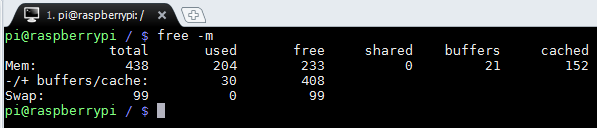
Command returns three lines. The first line “Mem:” shows memory from kernel perspective. Kernel sees 233 MB of “free” memory. This memory is not allocated for anything, it just sits there being ready to be used. It’s this number that my friend interpreted as being the only memory that can be used by user programs and processes.
To help get the proper interpretation of free command I prepared a small illustration showing which values are added together.
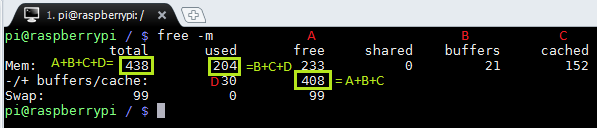
On my RPI 152 MB of memory is dedicated for caching and 21 MB for buffers.
Second line is a look at the memory from process perspective rather than kernel. This is the line of interest. 30MB is used by running processes. With -/+ the “free” is trying to point out that buffer/cache has been removed (-) from “used” column and added (+) to “free” column. Why? Because the second line as I pointed above looks at memory from process perspective and any process can get portion of memory from buffer/cache if needed. So, having 408MB of free memory for user processes on my RPI looks much better than 233MB :-).
The “shared” column shows how much memory is shared by multiply processes and it’s 0 on my RPI, as well as on my other Linux boxes. (Perhaps this column is simply deprecated on recent kernel versions!?)
Also note that kernel reserves for itself at boot some portion of memory, which is not shown as part of the “Total”.
Toad and pipe on Slovenian Keyboard
After you install Toad on workstation with Slovenian keyboard you might find out that you can not enter pipe (|) as usual, with AltGr+W in Toad Editor. Entering AltGr+W will open “Watches” instead of displaying pipe. The workaround is simple, go to Toad menu and select View -> Toad Options… -> Toolbars/Menus -> Shortcuts.
In combo box sort the content on column Category. Scroll to the “Editor” entries and find the line for command “Watches”. Select the line and replace default Ctrl + Alt + W with something new, for example Shift + Ctrl + Alt + W, as shown on the picture.
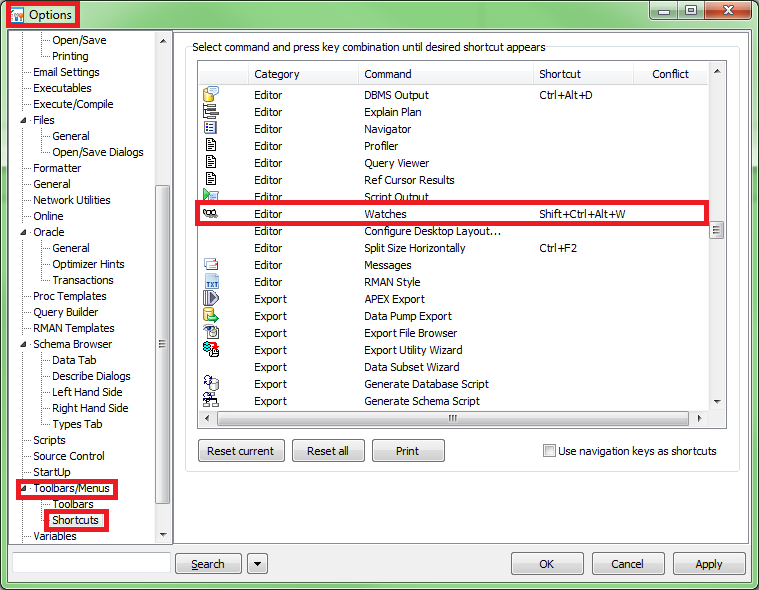
This is apparently a bug in Toad where Ctrl + Alt + W somehow equals AltGr + W!?
True XCOPY runtime for Oracle ODP.NET application
I was struggling for quite some time with my colleague at work on migration of our legacy (ODAC 10g + .NET 2.0) client/server applications to centrally managed runtime environment. Applications that run flawlessly by the users with Windows XP SP3, stopped working on newer configurations with Windows 7 x64 and ODAC 11g R5.
This is a short memo on how to prepare runtime environment for Oracle ODAC based .NET application that can be run from a network drive. Oracle at the time of this writing does NOT have a proper document covering a “true” XCOPY based installation. With a “true” XCOPY installation I mean the one that doesn’t need any super user privilege to install application on client — we want totally GAC agnostic ODP.NET application runtime env. In short, we don’t want to run neither install.bat nor configure.bat script from ODAC client zip file shipped by Oracle.
(If you wonder why? Because GAC is utterly disgusting .NET “thing”, almost as disgusting as the windows registry, and a clear evidence that MS will never learn from *nix).
In summary the objective is:
- allow our end users with Windows XP SP3 (32-bit) or Windows 7 EE (32-bit or 64-bit) to run simple WinForms .NET applications in C/S mode
- some clients are also developers with local (“by-the-book”) installation of ODAC (10g, 11g) with GAC registrations, they should be able to run prod. applications in a complete isolation from their local environment.
- all .NET application must be installed centrally on our main file server and must as well use centrally installed Oracle client with ODAC
- all that is needed to install application on client workstation is to create shortcut that points to startup routine to launch application from file server. No super-user privilege is allowed as a prerequisite for application installation!
And here are the steps that we followed:
- Download “ODAC 11.2 Release 5 (11.2.0.3.20) with Xcopy Deployment” from OTN”
- Unzip ODAC1120320Xcopy_32bit.zip to some temporary directory, let’s say G:\TEMP. Then copy relevant directories (in our case instant client + ODP.NET 4.0) to network drive.
Do NOT run install.bat! Let’s say that our target network directory that’ll be used by all .NET apps is N:\ORACLE\ORA11odacR5.
// copy instant client and odp.net4 from temp directory

// to network based N:\ORACLE\ORA11odacR5

cmd> g:

cmd> cd g:\temp

cmd> xcopy instantclient_11_2 N:\ORACLE\ora11odacR5 /I /E /F /R /Y

cmd> xcopy odp.net4 N:\ORACLE\ora11odacR5 /I /E /F /R /Y
- make sure that .NET application build is targeted at .NET 4.0 and x86 platform. We do NOT recommend using “Any CPU” for mix (32-bit & 64-bit) clients, sometimes we run into problems on x64. We also strongly recommend using 4.0 for the lowest .NET target framework. Previously (.NET 2.0 – 3.5) we needed to authorize client PC’s before users could run .NET apps from our file server. On .NET 4.0 this is not necessary any more. Since 4.0 is the highest .NET framework version still supported on XP SP3 the decision to deploy to 4.0 was trivial. Some screenshots showing our build instructions:
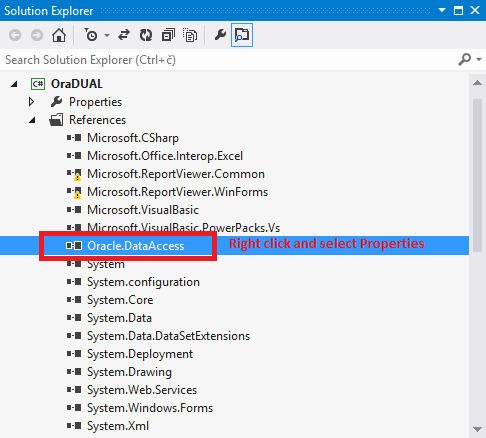
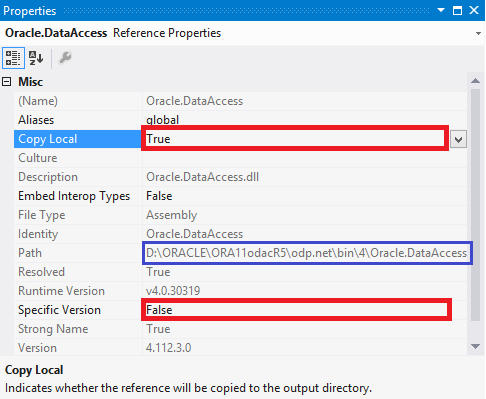
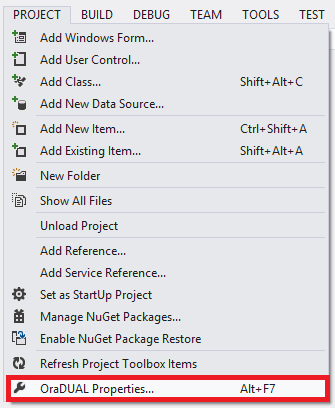
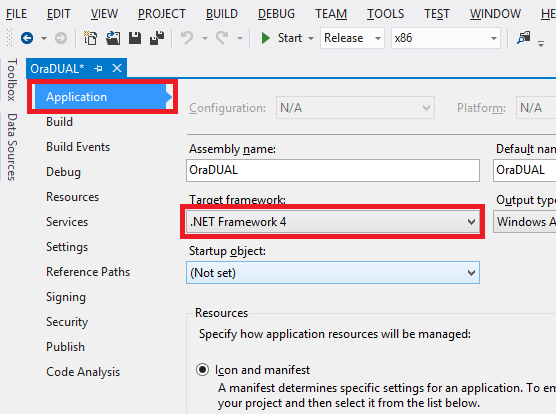
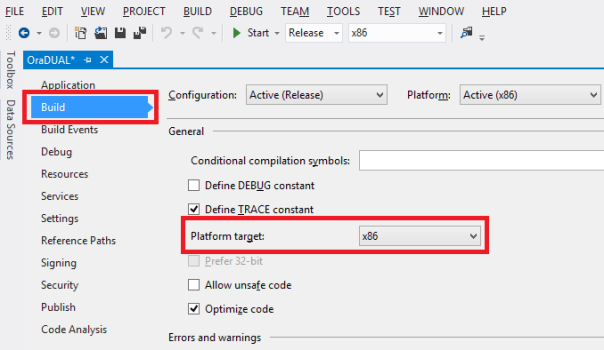
Note that on second picture application “build” is using locally installed Oracle.DataAccess.dll (framed in blue) and this is ok. Developers can use whatever Oracle.DataAccess.dll they want, even an older one (one of our application was developed with 10g Oracle.DataAccess.dll, but deployed to runtime env. with ODAC11g R5), because in the next step we’ll override developer “choice” with our network based (latest) ODAC 11g R5. And this can be done with app. config.
- Generate and then customize application config xml file (in our case OraDUAL.exe.config. And precisely here is where Oracle documentation is not clear and precise enough. How should application config look like that could be used on workstation without any Oracle client (more precisely on workstation where Oracle OUI or install.bat didn’t run, hence machine.config is untouched).
<?xml version="1.0" encoding="utf-8" ?>
<configuration>
   <!-- configSections was copied here from one of our developer's machine.config
        where ODAC11g R5 was installed with install.bat. Note that you can not
        blindly copy this section because different ODAC version may have
        different PublicKeyToken. Always check what Oracle sets up!
    -->
   <configSections>
    <section name="oracle.dataaccess.client" type="System.Data.Common.DbProviderConfigurationHandler, System.Data, Version=4.0.0.0, Culture=neutral, PublicKeyToken=b77a5c561934e089" />
    <section name="system.data.oracleclient" type="System.Data.Common.DbProviderConfigurationHandler, System.Data, Version=4.0.0.0, Culture=neutral, PublicKeyToken=b77a5c561934e089" />
   </configSections>

   <!-- This section needs either properly edited machine.config from Oracle OUI
        (or install.bat from instant client) or manually added configSections (see above).
        Note that DllPath needs to point to the Instant client directory,
        not to the Oracle.DataAccess.dll directory!
    -->
   <oracle.dataaccess.client>
    <settings>
      <add name="DllPath" value="N:\ORACLE\ORA11odacR5"/>
      <add name="FetchSize"             value="65536"/>
      <add name="PromotableTransaction" value="promotable"/>
      <add name="StatementCacheSize"    value="0"/>
      <add name="TraceFileName"         value="%TEMP%\odpnet.trc"/>
      <add name="TraceLevel"            value="0"/>
      <add name="TraceOption"           value="0"/>
    </settings>
  </oracle.dataaccess.client>

  <!-- Here we're telling .NET framework two things:
       - which version of Oracle.DataAccess.dll we want to be used
       - and from where exactly it should load the assembly.
       Any version of Oracle.DataAccess.dll between 0.0.0.0 and 4.112.3.0
       will be replaced by 4.112.3.0.
       Note that publicKeyToken is "hash" dedicated to Oracle Corp. but might
       change in the future. We checked the token against GAC.
  -->
  <runtime>
    <assemblyBinding xmlns="urn:schemas-microsoft-com:asm.v1">
      <dependentAssembly>
        <publisherPolicy apply="no" />
        <assemblyIdentity name="Oracle.DataAccess"
                          publicKeyToken="89B483F429C47342"
                          culture="neutral" />
        <bindingRedirect oldVersion="0.0.0.0-4.112.3.0"
                         newVersion="4.112.3.0"/>
        <codeBase
                version="4.112.3.0"
                href="file:///N:\ORACLE\ORA11odacR5\odp.net4\odp.net\bin\4\Oracle.DataAccess.dll"/>
      </dependentAssembly>
    </assemblyBinding>
  </runtime>
</configuration>
In case the application is build with additional libraries that internally depends on Oracle data provider (Oracle.DataAccess.dll) the same kind of config file needs to be prepared for each library (for example if OraDUAL.exe needs OraAcme.dll and OraAcme.dll is referencing Oracle.DataAccess.dll, then OraAcme.dll.config must be present with redirecting directives already shown in app.config).
- The final step is to prepare batch routine to launch our application from network drive.
:: RunOraDUAL.bat
:: Oracle11g [11.2.0.3] Instant Client with ODAC 11.2.0.3.20
::
:: Batch routine to launch OraDUAL.exe from newtork drive.
::
:: ---------------------------------------------------------

title Oracle11g Instant Client - ODAC 11.2.0.3.20
SET NLS_LANG=SLOVENIAN_SLOVENIA.EE8MSWIN1250
SET NLS_DATE_FORMAT=DD.MM.YYYY
SET ORACLE_HOME=N:\ORACLE\ORA11ODACR5
SET TNS_ADMIN=N:\ORACLE\ORA11ODACR5

SET PATH=%ORACLE_HOME%;%ORACLE_HOME%\ODP.NET4\BIN;%ORACLE_HOME%\odp.net4\odp.net\bin\4;%PATH%;

start OraDUAL.exe
:: End
Make sure that you include both \BIN directories that belongs to ODP.NET4 to the path!
In our case we put RunOraDUAL.bat in the same directory with OraDUAL.exe and OraDUAL.exe.config.
Note that you do NOT need to place Oracle.DataAccess.dll to application directory even though VisualStudio will copy
Oracle.DataAccess.dll in \BUILD directory because we instructed this with “Copy Local = True” (refer to screenshot #2)!
The only thing we copied to network share N:\APPS\OraDual is exe and config file.


Transition is over…

I setup my first blogging site on our intranet more than a decade ago (2002), running (back then) a very new and very popular Movable Type. For years, system run smoothly and I can’t say anything bad about MT, but rather that blogging became from technical point of the view almost boring. And the fact that MT is written in Perl definitely helped me stay away from doing any hacking myself.
Then (~2004) things become interesting, I started to learn Python. It was not long and I migrated my intranet based MT site to python powered Plone (~2005). I replaced simplicity with fully blown CMS. Plone is the best CMS I worked with so far, I believe it’s the most powerful and prettiest CMS in existence. Nothing comes close to the power and beauty of Plone. But at a price. Back then you needed a pretty powerful server to run it smoothly or find a plone friendly hosting provider (not that many existed 8-9 years ago, almost a decade before “cloud hammering” hit us from everywhere). If you want to use Plone, you need (at least) VPS (Virtual Private Server), you can forget about cheap shared hosting plans. The bottom line is that Plone was simply too powerful, for the job that I needed to be done.
It was 2007 and I knew that I want simplicity back, I needed classic LAMP. Thanks to “Linux Journal” the search was not hard, I soon found my next CMS of choice, Drupal. Drupal was much simpler than Plone, but at the same time quite different, so the learning curve was steeper than I anticipated.
Considering Drupal overall popularity it was easy to find hosting provider offering support for Drupal. But finding good hosting provider is never easy. I must say I was lucky with my first pick, OpenSourceHost, which reliably and professionally hosted dbaportal.eu for the last 5+ years, plus I was quite happy with entry level 95$/year shared hosting plan. If you need reliable hosting provider, look no further.
In 2012 I already knew that it’s unlikely we’ll ever need all the features Drupal has to offer. Unfortunately, all those features represents target area for hackers and we observed that our site was under constant “attack” from various bots, trying to get in. From security maintenance point of the view Drupal become a burden for us.
I again started to evaluate alternatives that could even further lower the complexity of managing (upgrading, patching…) our site — if at all possible completely eliminating the maintenance part, allowing us to concentrate on publishing short notes with little interference. As you already know by now, WordPress.com was a no-brainer for our new hosting provider. For approx. 26$/year we can do more or less everything we could do before and even more (SSL access for example). I sincerely hope WP will last longer than MT + Plone + Drupal did together. Cheers!
Ales
Oracle Advanced Security option – free in Oracle12c EE!?
This is just a short announcement after being off the air for a awhile…thanks to Timur blog post I found out that Oracle is planning to include Oracle Advanced Security Option in plain vanilla Oracle12c Enterprise Edition – free of charge (according to Tom Kyte presentation in Moscow a couple of weeks ago).
From time to time miracles does happen…, now AWR is the next logical option that should follow in12c R2 ;-)

 dbaportal.eu
You must be logged in to post a comment.