Author Archives: alesk
OPATCH 11.2.0.3.0 LOCKS SRVM.JAR
A month ago I hit Bug 13902704 “SRVM.JAR IS LOCKED BY OPATCH 11.2.0.3.0” while trying to apply Patch 3 (Patch# 13570057) on top of 11.2.0.3 (Windows 7 x64 & 2008 R2). With Sysinternals Procmonitor (better than Process Explorer for tracing file usage) I soon found out that opatch 11.2.0.3 itself is locking out of the game install process.
Opatch greeted me with the error shown in the screenshot’s:


Ok, I said to myself, I’ll wait for Patch 4 (13783453), someone at Oracle will certainly notice such an apparent bug. It didn’t happen and I’m not surprised anymore. It’s not that nobody outside of the Oracle Corp. patches Oracle kernel, it’s more likely no one from Oracle Corp. is testing patch installation anymore. At least not in live.
Anyway, according to support note 1446273.1 the workaround for the bug is simple file rename before and after opatch apply:
cmd> move %ORACLE_HOME%\OPatch\jlib\oracle.opatch.classpath.jar %ORACLE_HOME%\OPatch\jlib\oracle.opatch.classpath1.jar
cmd> opatch apply
cmd> move %ORACLE_HOME%\OPatch\jlib\oracle.opatch.classpath1.jar %ORACLE_HOME%\OPatch\jlib\oracle.opatch.classpath.jar
Bug will be fixed in the next opatch release.
OracleXE 11g – finally
The wait for OracleXE 11g is closing to an end, Oracle announced OracleXE 11.2 Beta, available for Windows x32 and Linux x64. I can’t remember if Oracle published public beta for OracleXE 10g at all!? It certainly seems a right thing to do, to offer Oracle community a chance to put the new release through realistic tests. Enjoy downloading and installing!
[Update] The rumor was that Apex 4 will not ship together with the OracleXE 11g, at least in beta this is not true.
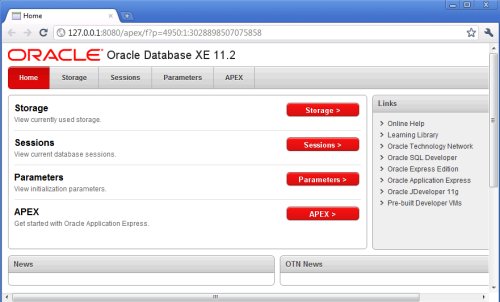


According to license agreement from documentation set, Oracle raised the database size limit from 4GB to 11GB, 1 instance per physical server, 1 CPU and 1GB RAM remains unchanged restrictions, which I found reasonable.
11g R2 certified on OEL 6, finally…
It took Oracle a lot of time to certify Oracle 11gR2 and Fusion Middleware, but they finally did it, according to Wim Coekaerts blog post. And the good news doesn’t stop here, he also announced free access to bug and security fixes from Oracle public yum repository. Something that was reserved for the ULN subscribers. Good news for many of us who felt ULN is not worth a dime without Ksplice and Dtrace. This is certainly a bad news for Red Hat, as they’ll likely loose some percentage of their existing customers, I’m afraid. I sincerely hope this pressure on Red Hat from Oracle will end up with a happy ending for Red Hat.
How to patch ESXi 5.0
A short memo about patching ESXi 5.0 without Update Manager:
- Download VMWare patch, in my case I downloaded recently released Update 1 for ESXi 5.0:
http://www.vmware.com/patchmgr/download.portal - upload zip file to ESXi datastore
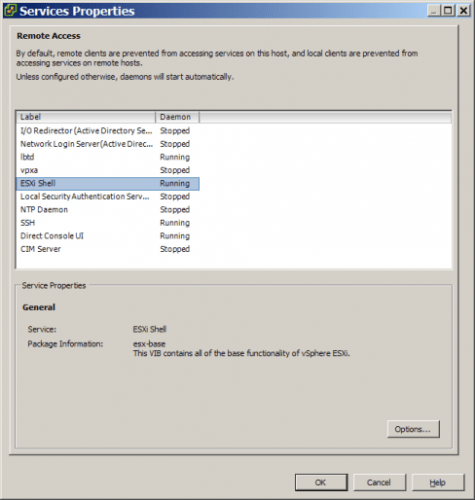
- check that ESXi shell and SSH access is running:
– connect to ESXi with vSphere Client, then open Configuration tab, select Security Profile, open Properties
– check that ESXi shell and SSH are running, if not then turn them on:
- shutdown all VM’s
- use whatever ssh client you prefer to connect to ESXi host as root
- install patch with the esxcli (change path to the patch appropriately):
esxcli software vib install --maintenance-mode --depot /vmfs/volumes/datastore2/ISO/VMWareUpdate1/update-from-esxi5.0-5.0_update01.zip
Note that everything must be on the same line!
- reboot ESXi host
I had a severe network performance problems with base 5.0 release that installation of Update 1 fixed.
CopSSH 4.2.1 on Windows 7/2008R2
As you might be aware of by now, CopSSH 4.2.1 was the last freely available CopSSH version. Hopefully, I downloaded this version before it was removed from ITeF!x site. CopSSH is still my favorite SSH server for Windows, in the future I’ll likely be more than willing to pay for binary builds but as of now, 4.2.1 is what we’ll be using on our Windows servers for a couple of years.
The objective is to replace CopSSH 1.4.2 – 1.4.6 running on Windows 2003 R2 (x64) with version 4.2.1, which we’ll install on various machines running Windows7 SP1 (x64) and Windows 2008 R2 SP1.
Since CopSSH is mainly used for password-less authentication (remote job execution), I’ll briefly document a PK authentication setup routine for a brand new box.
-
CLIENT SIDE
- take a backup of your existing CopSSH installation directory
- I prefer uninstalling existing CopSSH version instead of upgrading, because I believe CopSSH upgrading setup is broken and not worth the time to troubleshot. Go to Control Panel and deinstall copssh plus ICW related stuff (ICW Base, ICW COPSSHCP and ICW OpenSSHServer).
Check local users accounts, if you find that SvcCOPSSH account is still present after you previously deinstalled CopSSH, you must delete that account before you start with fresh installation!! Also delete %ProgramFiles(x86)%\ICW directory if you used default directory as a target for your old installation. - install CopSSH 4.2.1, more or less usual “Next-Next” routine
- activate local user that you’ll be using in your batch scripts (I activated my local account: alesk)
- open command line and prepare environment:
cmd> set PATH=%ProgramFiles(x86)%\ICW\bin;%PATH%
cmd> set HOME=/cygdrive/c/Program Files (x86)/ICW/home/alesk
- Generate private/public key pair:
cmd> ssh-keygen -t rsa

Generating public/private rsa key pair.
Enter file in which to save the key (/home/alesk/.ssh/id_rsa):
Enter passphrase (empty for no passphrase):
Enter same passphrase again:
When prompted for the passphrase, DO NOT enter password, just hit Enter twice, so that you’ll have no password protected key pair.
Make sure that you’re fully aware of security implications of no password protected key pairs. If you’re not sure about the consequence google around and make sure a proper file permissions are set on those two files! Discussion of security implications is simply above and beyond this topic. - Append public key (/home/alesk/.ssh/id_rsa.pub in my case) to the server authorized_keys file. Assuming that I have ssh daemon available at server:
- Here is an example where I added some properties to the key on server side, which limits what can owner of the key actually do on the server and from where…
# # example of the key which limits password less execution to particular host and predefined command # from="HP-LAPTOP,ASROCK,!Foo.acme.com",no-port-forwarding,no-X11-forwarding,no-agent-forwarding, no-pty,command="ls -l" ssh-rsa AAAAB3NzaC1yc2EAAAADAQABAAABAQC3TwQsIG6uGXGgGVhOgDLEyp33Qu7RqEJpxh1QlQQ4X2 Pdjind4Y6vyG4q0P/VLBisrs7/eC/kr+1mntu2Coh+MyMF2h6w1L+34Z53kpYWJgxv8Uc0qCmTGbPc nDt5xa/bcIYZp6pB2caDGUT+SQ0QAdhbA2Wy+1JIlav6C2GMDGwPPtiWMRJ0dCdczS2SdD8Z6pCib ZLaipnFOsLig93Hk9+AJNpgIhkJ/i03/w+a76aMcv5PEiwsZIk1vJZIXTI8L7eFRz2ICpd4qi6wN690Rtd W73W3zIRTe4HPMx2ESTVS26AHHS8qH0TlZEa3OGKA6a0OGkomdihQD5JpnBE7 alesk@HPWIN7
SERVER SIDE
cmd> scp  ~/.ssh/id_rsa.pub myserver:/home/alesk/.ssh/id_rsa.pub.tmp
cmd> ssh alesk@myserver
ssh> cat /home/alesk/.ssh/id_rsa.pub.tmp >> /home/alesk/.ssh/authorized_keys
ssh> rm  /home/alesk/.ssh/id_rsa.pub.tmp

 dbaportal.eu
You must be logged in to post a comment.