Blog Archives
Preparing Windows 7 bootable USB key
There are tons of blog posts on the net about how to make USB bootable key with Windows 7. Here is how I prepared my 4GB USB key with Windows 7 for installation on my netbook;
To follow this recipe you’ll need:
– Windows 7 or Vista PC (not XP!)
– 4GB USB key or larger
– Windows 7 DVD (or ISO image with some ISO mounting tool, such as Virtual Clone Drive)
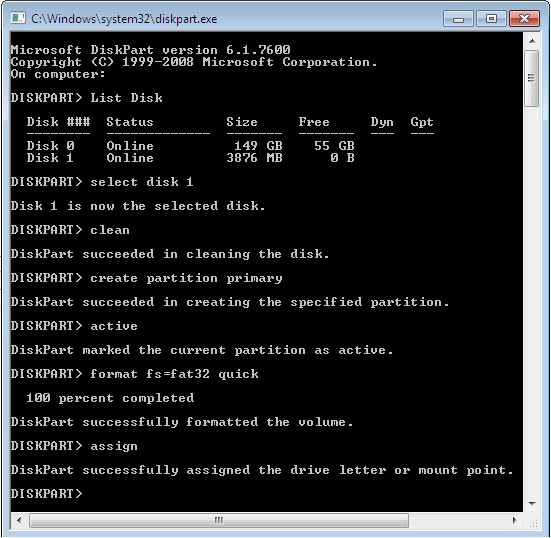
STEP 1) Prepare USB key with diskpart (make sure USB key is empty)
Open command prompt with Administrator privileges and start diskpart, then execute steps in similar way as they’re shown on picture:
STEP 2) Copy files from Windows 7 DVD to USB key
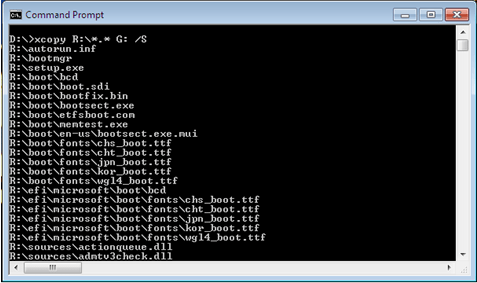
Let’s assume your USB key got letter G: and your DVD is mounted on R:, open command prompt and copy files with xcopy:
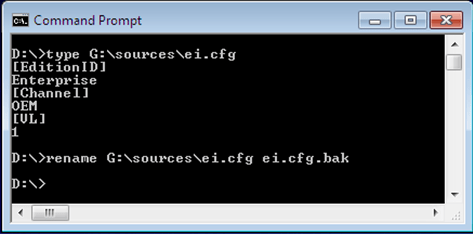
STEP 3) Optional – rename ei.cfg file
If you rename (or remove) ei.cfg file from sources directory then Windows Installer will give you a menu from which you can pick a particular Windows version (Ultimate, Professional, etc.) that you want to install.
Resetting TCP/IP stack on Windows XP
Last week I installed IXIA Endpoint on my PC for the sake of some network benchmark test done by our network support contractor. A couple of days later I noticed weird behavior accessing shared files from one of our server. Only my workstation has sporadic problems accessing files (SMB as well as RDP protocol) on single server. IXIA endpoint was my first suspect because I allowed IXIA install program to change my TCP/IP settings. De-installing IXIA endpoint didn’t help and neither updating Windows XP with the latest hot fixes. Partly due to the time pressure I gave up with troubleshooting and decided to simply reset TCP/IP settings according to Microsoft support Article 299357.
Simple netsh command followed by reboot did the trick:
cmd> netsh int ip reset resetlog.txt
The problem seemed to go away. In resetlog.txt netsh writes every registry key or value that was either reset, added or deleted. Another Microsoft article worth having among bookmarks when you need to troubleshoot network connections is How to troubleshoot TCP/IP connectivity with Windows XP.
IBM SDDDSM driver – 2.4.1.2-2
During some tests done with ORION (10.2.0.1) on IBM x3950 server attached to IBM DS80000, I manage to repeatedly crash the server. It usually crashed at the end of 14h long test with ORION running in advanced mode. I decided to run Windows Update and install all fixes on top of Windows 2003 x64 SP2, plus update IBM Subsystem Device Driver Device Specific Module (SDDDSM) from version 2.1.3.0-1 to 2.4.1.2-2. Without a machine type number it’s close to mission impossible to find the driver on IBM web site. I guess they rearrange the site to be worse than it was a year ago when I needed SDDDSM. That’s the reason why I wrote down this note with the link to download section.
Running cmd.exe under System account
I was experimenting with sqlplus -prelim option, trying to “bypass” connect / as sysdba part from command sequence by launching sqlplus under System account (the same account Oracle service is running under). The problem was that I was working remotely within Remote Desktop session, so an old trick:
cmd> at 12:00 /interactive cmd.exe
didn’t work. You have to seat at console to see the command prompt interactively.
A quick search on net revealed a quick fix for the problem:
cmd> psexec -i -s cmd.exe
Resulting in command prompt that runs under System account:
PsExec v1.72 - Execute processes remotely

Copyright (C) 2001-2006 Mark Russinovich

Sysinternals - www.sysinternals.com
Microsoft Windows [Version 5.2.3790]
(C) Copyright 1985-2003 Microsoft Corp.
C:\WINDOWS\system32>
You can download the latest psexec version from:
http://live.sysinternals.com/
SlySoft Virtual CloneDrive
In the Late August 2009 issue of the newsletter Mark Minasi recommended free ISO mounting utility for Windows x86 and x64, freeware by SlySoft, Virtual CloneDrive. Until now I was using Microsoft Virtual CD-ROM. I can’t say I was disappointed by Virtual CD-ROM but on the other hand I didn’t use it on Windows x64 where (according to Mark Minasi) it doesn’t work reliably. Anyway, Slysoft freeware looks more polished and will likely replace Microsoft Virtual CD-ROM on my desktop.

 dbaportal.eu
You must be logged in to post a comment.