Category Archives: MS Windows
Notes about various technical issues of supporting and administering Windows Servers.
ShellRunas
Recently I’m more involved with Windows 2008 Server and nuances Microsoft delivered with this release (ok, they started with Vista, but this is an OS I simply don’t care about). One such odd decision that MS team made was to replace “Run As…” in Explorer shell with Run As Administrator, removing the option to enter alternative account.
You can still use command line tool runas in the same way you can on XP/2003, which is fine if you want to create permanent shortcut on your desktop to launch some application as some other user (not necessarily Administrator).
It’s silly that they removed “Run As…” from the Explorer Shell as this was really a convenient way for me — all I needed to do is to right click target application, select Run As, enter proper (“ordinary”, “application”…) user credentials and I was done. I was not surprised when I found plenty of complaints on the net about missing RunAs in the shell, so it didn’t come as a surprise when I found that Mark Russinovich delivered an applet that corrects that mistake. Simply download and install ShellRunas and you’re back in business.
Windows Search – enabling search in .sql files
It’s one of those little annoyances working with Windows that I encounter now and then, when Microsoft disables something, without giving us a user friendly way of overriding their choice. Someone on the public forum complained about Windows Search because he could not find some Oracle supplied sql script that is responsible for particular object creation. Of course, files with extension .sql are excluded from the Windows Search by default.
Out of the box (Windows XP/2003) an attempt to find some string in .sql scripts will not reveal anything (see example in the picture).

Microsoft knowledge base article KB309173 describes two methods to enable search in files that are by default excluded by Windows Search (such as .log, .sql, .xml, …). I prefer method 1, enabling search for particular extension (such as .sql, .log, .xml) instead of turning off completely the restriction.
In short:
1) open registry editor and navigate to HKEY_CLASSES_ROOT\.sql or another extension of your choice, such as .log, .xml,…
2) since we know that we’re dealing with plain text in those files we can add Plain Text handler by adding key named PersistentHandler with the default value {5e941d80-bf96-11cd-b579-08002b30bfeb}.

3) After log off / logon Windows search should find the string in .sql files
Microsoft Virtual CD-ROM Control Panel
Lately I work a lot with VMWare virtual machines and that’s why I keep all the relevant software in ISO images. I was looking for a simple (and free) tool that will allow me to mount ISO images on Windows XP workstations, outside of VMWare. You can find plenty of free software on the net but since Microsoft has it’s own tool, called Virtual CD-ROM Control Panel, I decided to use that one.
After you download the package, simply unpack VCdControlTool.exe and VcdRom.sys in any folder you wish and start VCdControlTool.
User interface is really simple:
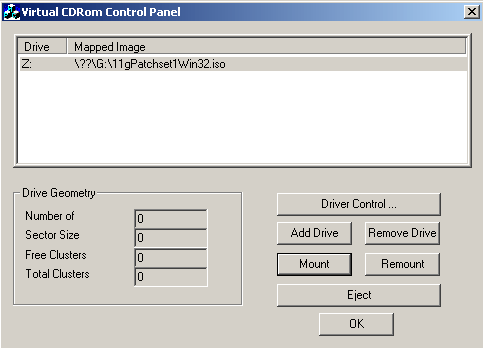
You’ll find detailed explanation in readme.txt that comes with the tool, here is a quick guide:
- Driver Control -> Install Driver -> Browse and select vcdRom.sys
- Start Driver
- Add Drive
- Mount -> Browse and select ISO that you want to mount
Upgrading MS OLAP 2000 to MS OLAP 2005
I’m not familiar with MS OLAP, but somehow one little MS OLAP database silently run for seven years on department server that is under our administration control. The thing is that this database was actually (and still is) used by several end users all this time (almost without a hitch). Not something we can easily replace with something else or simply throw away.
I’ll post some essential links here that I found helpful during my preparation phase for the upgrade.
Pushing the limits of Windows
Mark Russinovich started a blog post series under the title Pushing the limits of Windows – a must read if you’re professional sysadmin/dba working with Windows OS. He started the series with physical memory and will continue with other essential resources. I hope he’ll cover Large Pages memory support in one of his future posts.
In addition to Mark’s blog I would like to mark down two links mentioned in his blog:
- Memory Limits for Windows Releases
- Alex Ionescu’s blog and his tool, meminfo (unfortunately available only for Vista and Windows 2008)

 dbaportal.eu
You must be logged in to post a comment.