Category Archives: MS Windows
Notes about various technical issues of supporting and administering Windows Servers.
grepWin rocks!
Another essential tool that I added to my collection of tools on Windows is grepWin. Considering how limited Windows Search really is I found grepWin a great relief and ot only for regex searches but for the plain text searches as well. Well done folks!
RSA Tools For Windows 7
Thanks to TechRepublic newsletter I learned today that Microsoft released Remote Server Administration Tools for Windows 7 that can be downloaded from Microsoft Download center. At the time when Vista was released, Microsoft announced that they’ll not port Remote admin tools to this OS, instead they suggested really stupid workaround, Remote Desktop. Hello?? Back then I thought, what a bummer for Microsoft, now Vista is definitely not something I would care to even test at my workplace nor recommend to anyone. Fortunately, someone at Microsoft realized the mistake.
Anyway, you can install RSA Tools on Windows 7 Enterprise, Ultimate and Professional and you can manage Serve 2003/R2, Server 2008/R2. List of remote features that can be managed can be found in KB article 958830.
md5deep for Windows
Today I needed to compute md5 on 1TB+ files on Windows 2003 server, recursively. I’m a regular user of UnixUtils for Windows and thus GNU md5sum, but this time around I needed recursion on directories, something md5sum can’t do on it’s own. On Linux I would probably pipe the result of find command to the md5sum. Instead of writing some DOS (python?) script for Windows, I searched the Google and found md5deep tool that can do recursive operation on directory tree. In downloaded zip file you’ll also find related tools: sha1deep, sha256deep, hashdeep, tigerdeep and whirlpooldeep. Enjoy hashing :)
OpenVPN & Windows 7
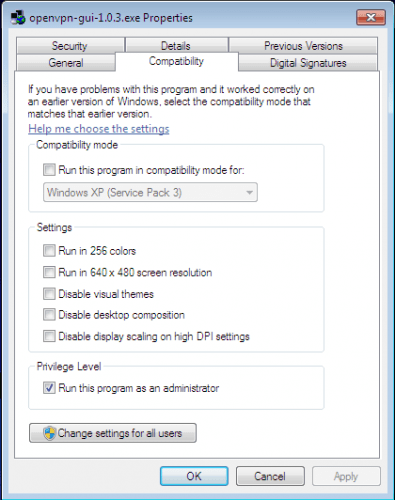
Skipping Vista altogether and moving to Windows 7 from XP as my primary workstation is causing me to troubleshoot my ignorance, here and there :-), especially with leveraged security built in Windows 7. One such application that I recently installed and that needs to run with admin rights is OpenVPN client. Routing part of OpenVPN client needs Administrator privileges. Instead of right clicking the application and picking “Run as Administator” each time, we can flag the application by right clicking executable, selecting Properties, then Compatibility tab and marking a check box “Run this program as an administrator” as shown on picture:
Preparing Windows 7 bootable USB key
There are tons of blog posts on the net about how to make USB bootable key with Windows 7. Here is how I prepared my 4GB USB key with Windows 7 for installation on my netbook;
To follow this recipe you’ll need:
– Windows 7 or Vista PC (not XP!)
– 4GB USB key or larger
– Windows 7 DVD (or ISO image with some ISO mounting tool, such as Virtual Clone Drive)
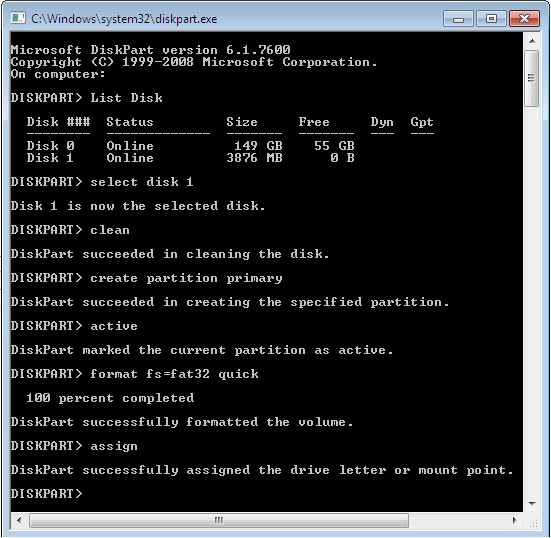
STEP 1) Prepare USB key with diskpart (make sure USB key is empty)
Open command prompt with Administrator privileges and start diskpart, then execute steps in similar way as they’re shown on picture:
STEP 2) Copy files from Windows 7 DVD to USB key
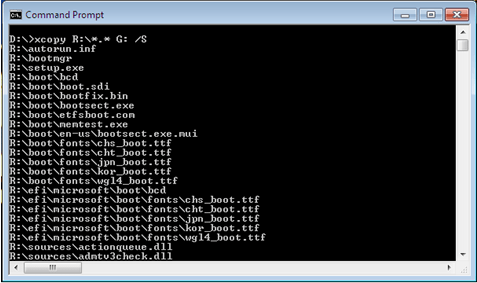
Let’s assume your USB key got letter G: and your DVD is mounted on R:, open command prompt and copy files with xcopy:
STEP 3) Optional – rename ei.cfg file
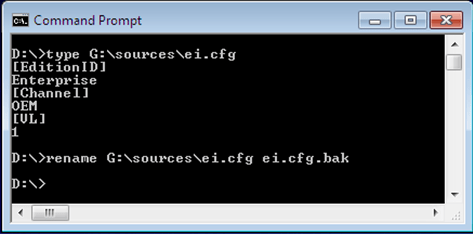
If you rename (or remove) ei.cfg file from sources directory then Windows Installer will give you a menu from which you can pick a particular Windows version (Ultimate, Professional, etc.) that you want to install.

 dbaportal.eu
You must be logged in to post a comment.