Author Archives: alesk
Gpg4win – file encryption
This is a short note about using GnuPG on Windows 7/2008R2 to encrypt file(s) with symmetric AES encryption. GnuPG is installed on every Linux box that I work with. Fortunately, Windows port is well maintained and for simple batch use it’s enough to install Gpg4win-vanilla package from gpg4win.org. Current version Gpg4win 2.2.21 is shipping GnuPG 2.0.22.
Make sure that you have Gpg4win binaries in PATH (try to run gpg2), if they’re not then add to your path:
SET PATH=C:\Program Files (x86)\GNU\GnuPG;%PATH%
Here is an example of encrypting single file with gpg2:
cmd> gpg2 --batch --yes --passphrase mysecret -z 0 --cipher-algo AES128 --output "D:\TEMP\MYBACKUP.BAK.gpg" --symmetric "D:\ETL\MYBACKUP.BAK"
We’re telling gpg2 that we’re running command in batch mode (–batch), that we don’t want to compress data since input file is already compressed (-z 0) and that we wan’t to use AES128 encryption. With –output switch we’re telling gpg where to write encrypted file – this parameter always precedes command (–symmetric in this case), otherwise we get an error. In current version it’s not possible to specify wildcards for files, so encrypting single file is the only option with –symmetric command.
Decryption is as easy as:
cmd> gpg2 --batch --yes --passphrase mysecret --output "D:\ETL\MYBACKUP.BAK" --decrypt "D:\TEMP\MYBACKUP.BAK.gpg"
PostgreSQL 9.3 – installation on Fedora 19
Here is my short note about installing PostgreSQL 9.3.1 on Fedora 19.
Add Postgresql yum repository to Fedora 19 (x64):
(see http://yum.postgresql.org/repopackages.php for up to date list of repositories)
$ wget http://yum.postgresql.org/9.3/fedora/fedora-19-x86_64/pgdg-fedora93-9.3-1.noarch.rpm
$ sudo rpm -i pgdg-fedora93-9.3-1.noarch.rpm
$ sudo yum update
Install PostgreSQL 9.3:
$ sudo yum install postgresql93
$ sudo yum install postgresql93-docs
$ sudo yum install postgresql93-server
$ sudo yum install postgresql93-contrib
$ sudo yum install postgresql93-devel
$ sudo yum install pgadmin3_93 pgadmin3_93-docs
Which Slovenian locale do I have installed on my system?
$ locale -a | grep sl_SI
sl_SI
sl_SI.iso88592
sl_SI.utf8
Initialize cluster with PGDATA on mount point of my choice:
// enter as a single line!!
$ sudo su - postgres -c '/usr/pgsql-9.3/bin/initdb
   --locale=sl_SI.UTF8' --pgdata=/u01/app/pg93/data


The files belonging to this database system will be owned
by user "postgres".This user must also own the server process.

The database cluster will be initialized with locale "sl_SI.UTF8".
The default database encoding has accordingly been set to "UTF8".
initdb: could not find suitable text search configuration for
locale "sl_SI.UTF8"
The default text search configuration will be set to "simple".

Data page checksums are disabled.

fixing permissions on existing directory /u01/app/pg93/data ... ok
creating subdirectories ... ok
selecting default max_connections ... 100
selecting default shared_buffers ... 128MB
creating configuration files ... ok
creating template1 database in /u01/app/pg93/data/base/1 ... ok
initializing pg_authid ... ok
initializing dependencies ... ok
creating system views ... ok
loading system objects' descriptions ... ok
creating collations ... ok
creating conversions ... ok
creating dictionaries ... ok
setting privileges on built-in objects ... ok
creating information schema ... ok
loading PL/pgSQL server-side language ... ok
vacuuming database template1 ... ok
copying template1 to template0 ... ok
copying template1 to postgres ... ok
syncing data to disk ... ok

WARNING: enabling "trust" authentication for local connections
You can change this by editing pg_hba.conf or using the option -A,
 or --auth-local and --auth-host, the next time you run initdb.

Success. You can now start the database server using:

  /usr/pgsql-9.3/bin/postgres -D /u01/app/pg93/data
or
  /usr/pgsql-9.3/bin/pg_ctl -D /u01/app/pg93/data -l logfile start
Change ip/port on which postgres listens
$ sudo nano /u01/app/pg93/data/postgresql.conf
I uncommented:
listen_addresses = 'localhost'
port = 5432
Start PostgreSQL
$ sudo systemctl start postgresql-9.3.service
Optionally enable PostgreSQL autostart on boot
$ sudo systemctl enable postresql-9.3.service
Now, you can also create shortcut to PG Admin that will point to /usr/pgsql-9.3/bin/pgadmin3.
Running BitTorrent Sync on Fedora 19 as a service
While setting up BitTorrent Sync (BTSync) on my Fedora 19 workstation at work I thought it’s about time for me to find a recipe on how to setup BTsync as systemd service. So far I start up BTsync manually via simple alias in bashrc, something like this:
alias startbtsync='~/BTSync/btsync --config ~/BTSync/btsync.conf'
Stopping was not as easy, since I had to remember BTsync PID (or grep ps -aux for it) and then use kill command. Thanks to jcollie post on BitTorrent Sync setting service for Btsync was a breeze. But let’s first see how I actually installed BTSync.
Make sure that you pick the latest build from Forum topic that is pinned at the top and is meant to announce the latest build with the proper link. Do NOT download BTSync from the front home page if you wish to work with the latest version with the least amount of bugs.
Installation was as easy as:
$ sudo tar -C /usr/local/bin -xvzf btsync_x64-1.2.71.tar.gz
I also created my “personal” BTsync config file:
$ mkdir ~/BTSync
$ /usr/local/bin/btsync --dump-sample-config > ~/BTSync/btsync.conf
The only thing that I changed was listen address, login name and password:
"webui" :
  {
    "listen" : "127.0.0.1:8888",
    "login" : "admin",
    "password" : "password"
  }
You can setup other options but this is out of the scope of this post. Let’s see now how can we start btsync as a service for one or more users of local workstation.
:: create config file for the service...
$ sudo nano /etc/systemd/system/btsync@.service

[Unit]
Description=BTSync for %i

[Service]
Type=simple
User=%i
ExecStart=/usr/local/bin/btsync --nodaemon --config %h/BTSync/btsync.conf
WorkingDirectory=%h

[Install]
WantedBy=multi-user.target
Now, we can start/stop Btsync as a service:
:: Start BTSync
$ sudo systemctl start btsync@alesk.service

:: Stop BTSync
$ sudo systemctl stop btsync@alesk.service

:: Status
$ sudo systemctl status btsync@alesk.service

:: Restart
$ sudo systemctl restart btsync@alesk.service

:: Autostart at boot
$ sudo systemctl enable btsync@alesk.service

:: Disable at boot
$ sudo systemctl disable btsync@alesk.service
Equivalently I added the following aliases in my .bashrc:
alias startbtsync='sudo systemctl start btsync@alesk.service'
alias stopbtsync='sudo systemctl stop btsync@alesk.service'
alias statusbtsync='sudo systemctl status btsync@alesk.service'
alias restartbtsync='sudo systemctl restart btsync@alesk.service'
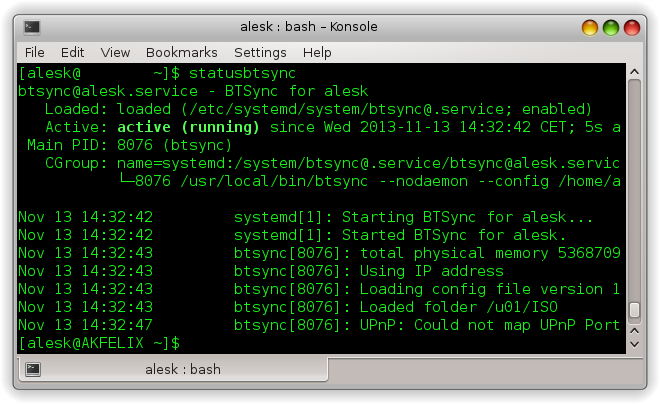
Getting status of Btsync from command line is now much easier:
Securing PostgreSQL
No doubt that PostgreSQL (PG) privilege system is very flexible one but at the same time, due to the architectural differences between PG and Oracle, it is also substantially different from patterns used in Oracle. Considering myself as a total PostgreSQL newbie, I thought it would be a good start for me to write down some basic PG security approaches (patterns?) in a form of a blog article.
Of course, since I’m a PG newbie, don’t take anything you read here for granted and please, don’t blindly follow my recommendations without trying this on your own — I’m sure some things could be done differently, more efficient or more secure. If you think I’m dead wrong on something I said here, please contact us and I’ll certainly correct the content with proper attribution.
Here is a business scenario that I’ll be referencing during this short “how-to” tutorial.
Acme Ltd. was an Oracle customer for many years. Recent economic downturn caused a serious cut in yearly IT budged expenses. Top management decided to deploy all newly build applications on open and free software stack. PostgreSQL was first and only choice for database layer by DBA team, developers where less enthusiastic, so they asked DBA team to prepare some proof of concept working environment, where they can try out PG features and test security framework.
Basic requirements are:
- separate development, test and production databases
- separate core application objects from reporting and ETL processes
- separate project roles (dba, developer, tester, web application)
- make as easy as possible to control who can connect to which particular database
- allow developers to work together on same application (schemas) in a way that they’re used to work in Oracle
- limit the chance to exploit superuser privileges over the network
- limit user privileges to the minimal set that they need for work to be done
- limit web application access to database from approved IP’s
Separating development, test and production databases
We decided to create three databases in PG cluster: PG1 (dev), PG2 (test), PG3 (prod)
As superuser:

-- PG1 - development database
CREATE DATABASE pg1
  WITH OWNER = postgres
       ENCODING = 'UTF8'
       TABLESPACE = pg_default
       LC_COLLATE = 'sl_SI.UTF8'
       LC_CTYPE = 'sl_SI.UTF8'
       CONNECTION LIMIT = 20;

REVOKE CONNECT, TEMPORARY ON DATABASE pg1 FROM public;

-- PG3 - test database

CREATE DATABASE pg2
  WITH OWNER = postgres
       ENCODING = 'UTF8'
       TABLESPACE = pg_default
       LC_COLLATE = 'sl_SI.UTF8'
       LC_CTYPE = 'sl_SI.UTF8'
       CONNECTION LIMIT = 50;

REVOKE CONNECT, TEMPORARY ON DATABASE pg2 FROM public;

-- PG3 - production database

CREATE DATABASE pg3
  WITH OWNER = postgres
       ENCODING = 'UTF8'
       TABLESPACE = pg_default
       LC_COLLATE = 'sl_SI.UTF8'
       LC_CTYPE = 'sl_SI.UTF8'
       CONNECTION LIMIT = 50;

REVOKE CONNECT, TEMPORARY ON DATABASE pg3 FROM public;
We think that default PG privileges are unreasonably generous on public schema.
So immediately after db creation we revoked privileges granted to PUBLIC schema. As superuser connect to each newly created database and revoke privileges:
$ psql -U alesk pg1

pg1=# REVOKE ALL ON SCHEMA public FROM public;

$ psql -U alesk pg2

pg2=# REVOKE ALL ON SCHEMA public FROM public;

$ psql -U alesk pg3

pg3=# REVOKE ALL ON SCHEMA public FROM public;
Separating core application objects from reporting and ETL processes
Schemas are perfectly suitable to achieve this goal. In each database we created three schemas, ACME (core application), ACMEREP (reporting), ACMELOAD (ETL stuff). Note that we deliberately specified postgres superuser as schema owner – for now – we’ll change this later on. We also created single demo table in each schema, solely for testing purposes.
Connect as superuser to each database (pg1, pg2, pg3) and run:
create schema acme authorization postgres;
create schema acmerep authorization postgres;
create schema acmeload authorization postgres;

create table acme.t1 (i int);
insert into acme.t1 values (42);

create table acmerep.t1 (i int);
insert into acmerep.t1 values (42);

create table acmeload.t1 (i int);
insert into acmeload.t1 values (42);
Manage roles and connections
In PG we have two kind of roles, login and nologin roles. Roles are global across PG cluster and thus shared by all databases in the cluster. Think about login roles as being users and nologin roles as being groups. With users we try to identify people (and/or applications) accessing our database and with groups we share permissions between people. It was not always like that, in PG versions before 8.1 there were two strictly separated entities; USER and GROUP, that’s why some old statements still work in PG 9.x, but it’s better to stick with the new terminology and syntax.
In this section we’ll create both kind of roles. Before PG allows user to connect to the database it checks pg_hba.conf file if there is a rule that approves user connection or not. PG is always processing rules in pg_hba.conf from top to bottom, the moment it finds satisfying rule it stops. So, it’s very important to carefully edit this file, because you can easily open the door to someone you don’t want to. When I first read about the concept behind pg_hba.conf I said, ok, it’s a simple and flexible way of controlling who can access the databases in PG cluster, but at the same time it’s also cumbersome and error prone to rely on DBA to properly edit configuration file for each new user account. There must be a better way and hopefully there is — we can manage connections to PG with standard permissions on database (granting “connect” role), pretty much like we’re used on Oracle.
Let’s create some roles. Connect to the PG as superuser…
For each database (pg1, pg2, pg3) create “special” group role that will control who can connect to particular database. We’ll add these roles to pg_hba.conf later on.
create role pg1_connect nologin;
create role pg2_connect nologin;
create role pg3_connect nologin;

grant connect on database pg1 to pg1_connect;
grant connect on database pg2 to pg2_connect;
grant connect on database pg3 to pg3_connect;
--
Now we should edit pg_hba.conf. Personally, I want to edit this file just once per database, not once for each user. Ideally, this file should not contain any users (login roles) at all, but we’ll make an exception when creating rule for webapp login and this is fine. As in Oracle I would like to administer rights to connect to the database exclusively from psql, granting/revoking “connect” role.
# TYPE  DATABASE        USER            ADDRESS               METHOD
host	pg1             +pg1_connect    0.0.0.0/0               md5
host    pg2             +pg2_connect    0.0.0.0/0               md5
host    pg3             +pg3_connect    0.0.0.0/0               md5
--
The plus sign in front of pg1_connect role is the crucial trick that I was not familiar with until I read blog post by Shaun Thomas [3]. It means that rule will match *any* role that is *directly* OR *indirectly* member of this role. Without + the rule would match only that specific role.
Now, we need to create some login roles for developers. We decided that we’ll keep Oracle kind of schema pattern, where application is installed in dedicated application schema. Developers who work together will also share same login role that’ll give them access to particular schema.
Let’s first create login roles according to our application schema’s (ACME, ACMEREP, ACMELOAD), as super user login to PG cluster:
create role acme login password 'acmepwd';
grant pg1_connect to acme;
grant pg2_connect to acme;

create role acmerep login password 'acmereppwd';
grant pg1_connect to acmerep;
grant pg2_connect to acmerep;

create role acmeload login password 'acmeloadpwd';
grant pg1_connect to acmeload;
grant pg2_connect to acmerep;
Note that by default we allowed developers to connect to development and test database by granting them both connect roles (pg1_connect, pg2_connect). Developers are not allowed to connect to production database pg3.
Next, we need to transfer ownership of applications schema’s from postgres to newly created login roles. Connect as superuser to each database (pg1, pg2, pg3) and execute:
alter schema acme owner to acme;
alter schema acmerep owner to acmerep;
alter schema acmeload owner to acmeload;
Since we already created test table t1 in each schema that is owned by postgres, we would like to change table ownership on t1 tables from postgres to application schema’s login roles as well. We can issue individual SQL statement:
alter table acme.t1 owner to acme;
…or better yet, we can generate statements from information schema meta data:
select 'ALTER TABLE '||table_schema||'.'||table_name
 ||' OWNER TO '|| CASE when table_schema = 'acme' then 'acme'
                       when table_schema = 'acmerep' then 'acmerep'
                       when table_schema = 'acmeload' then 'acmeload'
                       else table_schema
                   END ||';'
from information_schema.tables
where table_schema in('acme','acmerep','acmeload');
which will result in:
ALTER TABLE acmeload.t1 OWNER TO acmeload;
ALTER TABLE acmerep.t1 OWNER TO acmerep;
ALTER TABLE acme.t1 OWNER TO acme;
At this point we have:
- three databases in PG cluster, separating development from test and production environment
- we removed default privileges on database from public as well as those granted on public schema
- in each database we created three schema’s to separate three distinct application modules
- we deliberately created login roles with the same name as application schema’s to resemble Oracle pattern of work for developers
- we transferred ownership on application schema’s to login roles dedicated to developers working together on particular application module (acme, acmerep or acmeload)
- we’re controlling connection privileges to the databases with pg_connect roles, rather than by editing pg_hba.conf file
So far so good, but there are still things to configure. We need to create dba account that’ll have enough privileges to manage all three databases at database level. Web application will also need special (limited) account with privileges on acme and acmerep schemas on PG2 and PG3 databases. Access from application server should be restricted to specific IP’s.
Another thing that needs to be done is limiting superusers connectivity. In production environment it’s a crucial protection step to disallow superuser’s to connect to PG cluster over the network — if superuser needs to do something on PG cluster she/he must first connect to server either with ssh or locally.
Setup roles for DBA and web application
Let’s begin with application “dba” login role. We have user Jack who is responsible for managing databases pg1-pg3.
As DBA he sometimes needs to create his own procedures, tables etc., that’s why he also needs his own schema. First login to PG cluster as superuser and execute:
create role pg1_dba nologin;
create role pg2_dba nologin;
create role pg3_dba nologin;

create role jack with login password 'jackpwd';
alter role jack set search_path to jack,public;

grant pg1_connect, pg2_connect, pg3_connect to jack;

-- give Jack ownership rights on application schema's
-- by granting him roles that're owners of those schema's!
grant acme, acmerep, acmeload to jack;

-- connect to each database (pg1, pg2, pg3) as superuser and run
create schema jack authorization jack;
Notice that we granted three existing application login roles (acme, acmerep and acmeload)
to Jack, thus allowing him to manage all objects that’ll be created by developers in application schemas using those three login roles. He can not create new databases and/or roles – these privileges remain in the domain of superusers. Finally, he has his own schema to keep his own objects away from the others.
Production application server is allowed to connect to test (pg2) and production (pg3) databases from specific IP only. Application uses data from schema acme with certain read/write privileges on schema acme and read-only privileges on schema acmerep. Total number of connections for webapp user should be limited to 20. Connect as superuser to PG cluster and run:
create role webapp login password 'webapppwd' connection limit 20;
grant pg2_connect, pg3_connect to webapp;

create role pg2_acme_edit nologin;
create role pg2_acmerep_read nologin;

create role pg3_acme_edit nologin;
create role pg3_acmerep_read nologin;

grant pg2_acme_edit, pg2_acmerep_read to webapp;
grant pg3_acme_edit, pg3_acmerep_read to webapp;
--
At this point webapp user has been granted roles with necessary privileges on objects in both schema’s, acme and acmerep. For now it’s just a single table, but additional privileges will be granted to edit/read roles by developers later. However, before webapp login role can access data in both schemas it needs one additional privilege: USAGE on both schema’s. We decided to create separate role just for this privilege. This’ll allows us to easily remove access to all objects in application schema’s with single revoke statement.
-- as superuser create nologin usage role in pg2 and pg3,
-- assuming that we

create role pg2_webapp_usage nologin;
create role pg3_webapp_usage nologin;

\c pg2

grant usage on schema acme to pg2_webapp_usage;
grant usage on schema acmerep to pg2_webapp_usage;

\c pg3

grant usage on schema acme to pg3_webapp_usage;
grant usage on schema acmerep to pg3_webapp_usage;
--
To allow webapp login role to access application schema’s on test and production databases:
grant pg2_webapp_usage to webapp;

grant pg3_webapp_usage to webapp;
--
Last but not least, we want to control from which IP’s can webapp user connect to the database. At the same time, we’ll configure pg_hba.conf in a way that’ll prevent superusers to connect to PG cluster from network.
Let’s start with the superuser. We’ll use the same trick as before, combining PG role with (+) entry in the pg_hba.conf. Connect to PG cluster with superuser and create special role wheel.
create role wheel nologin;

-- grant this role to every superuser
grant wheel to alesk, postgres;
…then all that we need is to allow local connection for wheel members and prevent connections from network by editing pg_hba.conf file:
# TYPE  DATABASE        USER           ADDRESS              METHOD
local   all             +wheel                                md5
host    all             +wheel         0.0.0.0/0              reject
Securing connection by webapp user is done in a similar way, with the help from pg_hba.conf.
host    pg1             webapp          10.10.10.11/24            md5
host    pg2,pg3         webapp          10.10.10.10/24            md5
host    all             webapp          0.0.0.0/0                 reject
We’re allowing connection to pg2,pg3 databases with user webapp only from 10.10.10.10/24. Webapp can also connect to pg1 from 10.10.10.11 which is application server dedicated to development. From all other IP’s connection attempts will be rejected.
Content of pg_hba.conf file on my laptop is shown in the following picture, where I grouped together different sections.
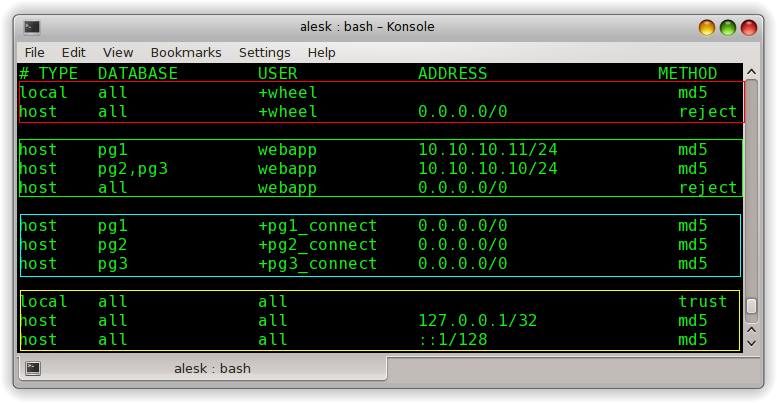
Note that the line using “trust” is there only for my own convenience when playing with PG on my laptop. This line should be removed from config file on production PG cluster!
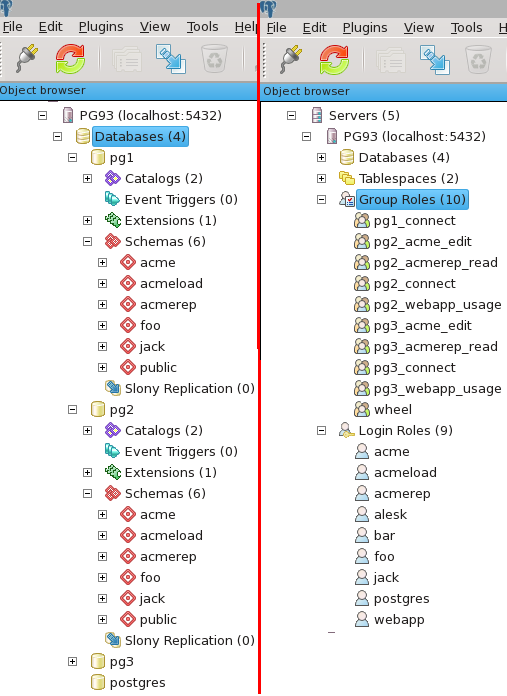
I’ll end my “article” with pictures showing the end result of above steps on my laptop in pgAdmin:
To recap:
- We have three separate databases for development, test and production with restricted permissions on schema public.
- In each database we created three schema’s dedicated to application.
- Each application schema is owned by login role with the same name. This login role is shared by all developers working on that particular module/schema.
- Application DBA for AcmeApp has rights on all three application schema’s, but otherwise lacks any superuser rights. Oracle variant of DBA (SYSDBA) is reserved for superusers.
- Superusers can’t work over the network, they can login locally only.
- We’re managing rights to connect to the particular database with database “connect” roles, rather than by tweaking pg_hba.conf for each user.
- Web application server can connect to PG cluster from restricted IP’s only.
There’re still things to be done to enhance PG cluster security, but that’s something I’ll leave for some post in the future — after all, I’m still in the early learning stage…:)
References:
Reading ServersCheck Status page from command line – Part 3.
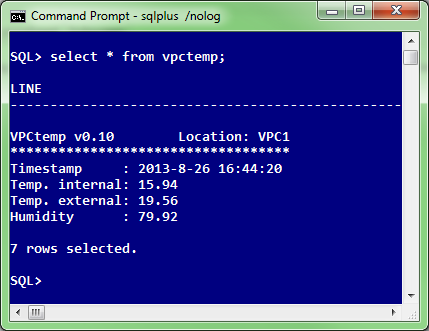
In the final, part 3 of the article, I’ll show you how we’re pulling from ServersCheck sensor the current temperature and relative humidity in our data center with simple SQL statement, like this:
If you recall, in Part 1 of the article I published Go “script” that could be compiled on all supported Go platforms, including Linux.
We decided that we’ll be using one of our existing Oracle11g XE instance running on Oracle Linux 6.4 (x64) to host our “vpctemp” application written in go. On this Linux server we already had the latest Go compiler installed (go 1.1.2 at the time of this writing), but we could as easily compile the vpctemp.go on some other box and then simply copy executable to our production Oracle Linux server — not worrying about some potential missing library, thanks to “go” statically compiled nature.
We copied vpctemp binary to /oracle/dba/go directory and turning on execution bit to allow vpctemp to be executed by oracle user:
[alesk@oraxe go]$ ls -l /oracle/dba/go
total 5056
-rwxr-xr-x 1 oracle dba 5177336 Jul 31 12:17 vpctemp
Then all that we did was to create “pseudo” external table. Pseudo in a sense that external table has no reference to external data file, instead all that it includes is a call to preprocessor directive. Preprocessor directive points to our golang program, which pulls data from ServersCheck sensor and prints the result to standard output, which is send to a client. Very simple and convenient way for ad hoc checks. (Oracle introduced preprocessor directive for external table in 11gR2 and later on backporting feature to 10.2.0.5 as well)
// SQL*Plus...connect alesk@oraxe

create or replace directory goexec as '/oracle/dba/go';
grant execute on directory goexec to dba;

create table vpctemp (
line varchar2(80)
)
organization external
(
     type oracle_loader
     default directory goexec
     access parameters
     (
          records delimited by newline
          preprocessor goexec:'vpctemp'
     )
     location
     (
          goexec:'vpctemp'
     )
);

create public synonym vpctemp for alesk.vpctemp;
grant select on alesk.vpctemp to dbateam;
And that’s it. For a DBA team getting the current temperature and humidity in a data center becomes as easy as:
SQL> select * from vpctemp;
** UPDATE May 2019 **
During the migration of golang vpctemp application from 11g to 18c database we got an error when querying from vpctemp external table:
SQL> select * from vpctemp;
select * from vpctemp
*
ERROR at line 1:
ORA-29913: error in executing ODCIEXTTABLEFETCH callout
ORA-30653: reject limit reached
We found out that Oracle external table “preprocessor” in 18c doesn’t like the first record (blank line) and since original external table (see DDL above) was created without an explicit reject limit, the Oracle created external table wit the default valu, “reject limit 0”. That’s why query failed immediately.
The workaround was newly created external table:
CREATE TABLE KAVSEK.VPCTEMP
(
  LINE  VARCHAR2(80 CHAR)
)
ORGANIZATION EXTERNAL
  (  TYPE ORACLE_LOADER
     DEFAULT DIRECTORY GOEXEC
     ACCESS PARAMETERS
       ( records delimited by newline
         preprocessor goexec:'vpctemp'
         nologfile
         nobadfile
	 )
     LOCATION (GOEXEC:'vpctemp')
  )
REJECT LIMIT 10
NOPARALLEL
NOMONITORING;
The result:
SQL> select * from vpctemp;

LINE
-----------------------------------------------
VPCtemp v0.10        Location: VPC1
***********************************
Timestamp     : 2019-5-31 13:19:09
Temp. internal: 13.88
Temp. external: ?
Humidity      : ?

6 rows selected.

 dbaportal.eu
You must be logged in to post a comment.