Author Archives: alesk
Microsoft Virtual CD-ROM Control Panel
Lately I work a lot with VMWare virtual machines and that’s why I keep all the relevant software in ISO images. I was looking for a simple (and free) tool that will allow me to mount ISO images on Windows XP workstations, outside of VMWare. You can find plenty of free software on the net but since Microsoft has it’s own tool, called Virtual CD-ROM Control Panel, I decided to use that one.
After you download the package, simply unpack VCdControlTool.exe and VcdRom.sys in any folder you wish and start VCdControlTool.
User interface is really simple:
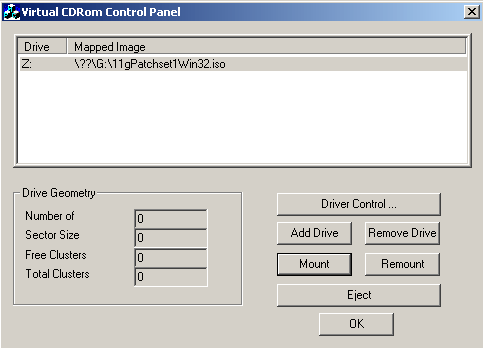
You’ll find detailed explanation in readme.txt that comes with the tool, here is a quick guide:
- Driver Control -> Install Driver -> Browse and select vcdRom.sys
- Start Driver
- Add Drive
- Mount -> Browse and select ISO that you want to mount
UTP – Wiring schema
In the past I didn’t really care for the proper color ordering of wires in 8P8C connectors (aka “RJ45”) while making UTP cables for my personal use. I knew that termination is standardized (T568A and T568B) but never took the time to memorize correct color termination – since I always needed “ordinary” UTP cables with straight through wired pins.
Of course, when you want to make a cross-over cable you need to know which pins need to be swapped. I found Wikipedia explanation so good and comprehensive that I decided to post a copy of schema termination picture here, for my future quick reference:
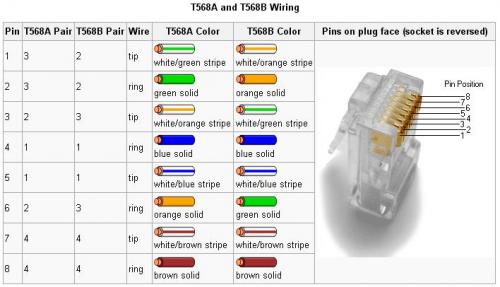
From now on I’ll stick with T568B wiring schema when I’ll need to wire “ordinary” UTP cables. For the cross-over cable we need to use T568A at one end of the cable and T568B at the other. * [Note added: 5th December 2008]I soon realized I made a mistake, what I wrote is true for 10Base-T and 100Base-TX and not for 1000Base-TX cross-over cable.
10Base-T and 100Base-TX cross-over cable follows above schema, at one end of the cable is T568A and at the other end T568B.
Gigabit cross-over cables are different, as I realized only after I read Wikipedia piece. Gigabit cross-over cable follows this schema:

“Optimizing For Performance” with Jože Senegačnik
Last week I attended a four day seminar held by Jože Senegačnik. The first three days covered theoretical part and if you plan to attend the course be prepared for a hefty amount of information (720+ slides). Considering the amount of material and in-depth knowledge of Jože about Oracle performance tuning and internals, I’m positive you’ll learn something new, no matter how experienced you’re (or you might think you’re;-).
The fourth day was reserved for practical workshop. Jože prepared a test Oracle XE database instance for each participant with sample database and PL/SQL package that we needed to tune during the day. Test scenario resembled TPC-C benchmark.
Since the elapsed time could vary from PC to PC due to the different HW configuration, he told us that we should concentrate on logical I/O (LIO), so we all started with approx. 1,1 million LIO per execution of PL/SQL package, with the goal to lower the LIO under 300K (which we did at the end of the day). And here comes a shameless advert for a profiler from my side. Instead of using tkprof for a trace file analysis we used profiler.
Jože is developing and enhancing his proprietary trace file analyzer called profiler since 2002. This is a command line tool written in C that runs on Windows (I’m not sure about Unix/Linux ports) that can be used instead of tkprof. Output is a html file with correct sql hierarchy and all the necessary statistics and timings. Profiler can be purchased by course attendees for 600€ (a fair offer if you ask me, considering the amount of work put in the development of this tool by Jože). Hopefully, I’ll publish some screenshots as soon as I get my copy of the profiler.
Anyway, if you have a chance to attend this course I’m sure you’ll not regret.
Oracle ADDM report: “Significant Virtual Memory Paging Was Detected…”
During my experimentation with ADDM with Oracle10g on Windows 2003 x64 I found frequent warning at the top of the report, such as:
Significant virtual memory paging was detected on the host operating system.
RECOMMENDATION 1: Host Configuration, 100% benefit (8567 seconds)
ACTION: Host operating system was experiencing significant paging but no
particular root cause could be detected. Investigate processes that
do not belong to this instance running on the host that are consuming
significant amount of virtual memory. Also consider adding more
physical memory to the host.
I knew that this message is likely a bogus one, considering that Windows OS handles virtual memory a bit different than other operating systems. If you launch Task Manager you can easily observe Page Faults rapidly increasing during warm up phase of the Oracle instance (for example after fresh startup):

The other day I found Oracle official explanation:
Note:395957.1 ADDM Reports “Significant Virtual Memory Paging Was Detected On The Host Operating System”
My recommendation is that ADDM advice on Windows platform should be cross checked with OS trying to find out if real memory paging is going on. If you found that for example Oracle process Peak Memory Usage is (was) close to the amount of physical memory, it’s very likely that ADDM warning is not a bogus one and that real memory paging is going on, that need to be addressed.
Upgrading MS OLAP 2000 to MS OLAP 2005
I’m not familiar with MS OLAP, but somehow one little MS OLAP database silently run for seven years on department server that is under our administration control. The thing is that this database was actually (and still is) used by several end users all this time (almost without a hitch). Not something we can easily replace with something else or simply throw away.
I’ll post some essential links here that I found helpful during my preparation phase for the upgrade.

 dbaportal.eu
You must be logged in to post a comment.