Blog Archives
Forms6i and Oracle11g R2
Can you figure out what is wrong with this picture:

Well, according to MOS note 207303.1 “Client / Server / Interoperability Support Between Different Oracle Versions” you supposedly should not be seeing this picture at all :).
It’s one of our legacy client/server application built with Designer6i R3 (with some Headstart sugar) that runs on Windows 7 with database session on Oracle11g R2. Application runs without a hitch. Against all odds! Remember, we’re talking about Net 8.0.6 underneath, client version that should receive ORA-3134 as a welcome message while attempting to connect to 11g. But it doesn’t. We’re also talking about Windows 7 (without relying on XP mode, btw.!) as a guest machine. If someone asked me a few days ago if this is possible I would say “No way José”. A simple question that was published on community forum triggered my curiosity and fortunately curiosity didn’t kill the cat, at least not this time.
Funny thing is that at the time when Oracle11g R1 was released I tried to connect with sqlplus 8.0.6 to 11g database and received the error ORA-00248 (see Jarneil blog), immediately dismissed the idea of even trying Forms6i app. against 11g R1.
Totally unsupported combination, of course. But who cares, Developer6i is out of support since 2005 and just seeing some posts on OTN about Developer 11g make one starting to choke. Of course, in our case this legacy application is not that important for the business and eventually the day will come when merciful shot will end the production life of an old dog.
Patchset 10.2.0.5 for Windows x86/x64
Last night Oracle finally released patchset 4 (10.2.0.5) for Oracle 10g R2 on Windows x64 (my download is going on right now :-).
In the last couple of days I was busy installing and testing 32-bit version of the patchset for Windows. Didn’t experience any difficulties so far, but it’s too early to push the upgrade to the client machines. There are some known issues related to ODP.NET for which I’m not sure that I did it right (need a confirmation from .net developers).
The rest of the week I’ll be installing and testing x64 version of the patchset on Windows 2003/2008 servers and if I find something worth sharing with the Oracle community, I’ll publish it here.
Goofing around with Oracle ASM 11.2 for Windows x64
The other day, I had some spare time to kill, so I decided to install recently released Oracle 11.2 ASM on one of my Windows 2003 x64 sandbox. I didn’t expect that I’ll end-up troubleshooting installment for the rest of the day. What happened?
I first installed ASM from 11.2 Grid infrastructure “CD” to Oracle home D:\ORACLE\ORA11R2GRID with “Install and Configure Grid Infrastructure for a Standalone Server” installation option. Then, I changed my mind and decided to remove R2 from the Oracle home name (if you’re asking why I’m not using Oracle defaults…->did I mention that I hate Oracle stupid default paths? I’m all for OFA “rules”, just not the Oracle ones – especially on Windows! ;-)).
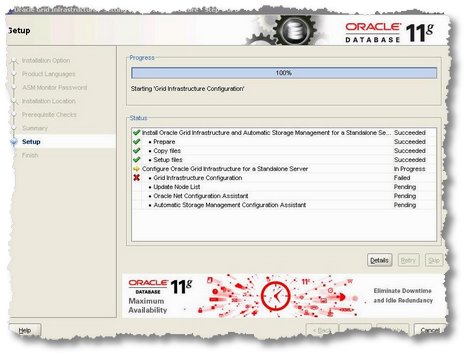
No problem, I whispered to myself. I launched OUI and selected ORA11R2GRID for de-installation, OUI instructed me that I need to run deinstall script from \ORA11R2GRID\deinstall directory. Which I did. All went well and ORA11R2GRID home was gone, or so I thought. Launched setup from grid “CD” again and repeated installation, this time in different home, D:\ORACLE\ORA11GRID. All went well until I hit the error at step “Grid Infrastructure configuration”:
[INS-20802] Grid Infrastructure Configuration failed.
as shown on picture:
…needless to say that I checked OUI log:

…there was nothing in the log that would help me find the root cause of the problem. I repeated installation several times, trying different things to identify the problem.
Finally, I sorted the Oracle inventory log files based on timestamp in descending order and in addition to installations* log files noticed additional logs, with more reassuring names, such as asmcadc_check*.log. As soon as I opened the last generated asmcadc_check log file I knew what might be causing the problem. At the end of the log I spotted reference to now non-existing home (ORA11R2GRID):
....
[main] [ 2010-04-13 09:38:09.609 PDT ] [WindowsSystem.dorunRemoteExecCmd:2061]  _WS_: Calling windowsNative with cmd: D:\ORACLE\ORA11GRID\bin\getcrshome.exe
[main] [ 2010-04-13 09:38:10.625 PDT ] [WindowsSystem.dorunRemoteExecCmd:2064]  _WS_: WinNative returned: true
[main] [ 2010-04-13 09:38:10.625 PDT ] [HAUtils.getCRSHome:594]  Configured CRS/HAS home = D:\ORACLE\ORA11R2GRID
[main] [ 2010-04-13 09:38:10.625 PDT ] [HAUtils.getCRSHome:572]  returning CRS Home: D:\ORACLE\ORA11R2GRID
[main] [ 2010-04-13 09:38:10.625 PDT ] [ASMUtils.checkASMExistence:562]  Exception in method:checkASMExistencePRCI-1113 : Directory D:\ORACLE\ORA11R2GRID does not exist
[main] [ 2010-04-13 09:38:13.953 PDT ] [USMCheckConfig.checkConfigInternal:177]  ASM was not detected in the Oracle Home
I opened regedt32 and checked HKEY_LOCAL_MACHINE\SOFTWARE\ORACLE for orphaned keys. I noticed that Oracle de-installation procedure didn’t remove HKEY_LOCAL_MACHINE\SOFTWARE\ORACLE\ocr key which was pointing to non-existing grid infrastructure home, D:\ORACLE\ORA11R2GRID. After I deleted the ocr key I repeated the Grid infrastructure installation for single server and this time around “Grid Infrastructure Configuration” step succeeded.
I guess troubleshooting episode such as this is (now and then!) acceptable “collateral damage” for going with the “my way” of doing things. Or is it just a convenient excuse for schallabweiserrei?:-)
Pseudo tape backup with RMAN
Today I was looking for a way to test RMAN tape backup on a machine without a tape device. I barely remembered that I somewhere read that RMAN supports that. With some cross search on different keywords I finally found Metalink support note 312737.1 “RMAN and Specific Media Managers Environment Variables.” .
Here is the output from my backup test on Windows 2003 (x86) with Oracle 10.2.0.2:
RMAN> run {
2>  allocate channel c1 device type 'SBT_TAPE'
3>   parms="SBT_LIBRARY=oracle.disksbt,ENV=(BACKUP_DIR=D:\BACKUP)";
4>  backup database;
5> }

allocated channel: c1
channel c1: sid=27 devtype=SBT_TAPE
channel c1: WARNING: Oracle Test Disk API

Starting backup at 23.03.10
channel c1: starting full datafile backupset
channel c1: specifying datafile(s) in backupset
input datafile fno=00001 name=E:\ORADATA\ORA5\DATA\DATA01\SYSTEM01.DBF
input datafile fno=00004 name=E:\ORADATA\ORA5\DATA\DATA01\USERS01.DBF
input datafile fno=00002 name=E:\ORADATA\ORA5\DATA\DATA01\UNDOTBS01.DBF
input datafile fno=00003 name=E:\ORADATA\ORA5\DATA\DATA01\SYSAUX01.DBF
channel c1: starting piece 1 at 23.03.10
channel c1: finished piece 1 at 23.03.10
piece handle=01l99etn_1_1 tag=TAG20100323T094735 comment=API Version 2.0,MMS Version 8.1.3.0
channel c1: backup set complete, elapsed time: 00:05:15
channel c1: starting full datafile backupset
channel c1: specifying datafile(s) in backupset
including current control file in backupset
including current SPFILE in backupset
channel c1: starting piece 1 at 23.03.10
channel c1: finished piece 1 at 23.03.10
piece handle=02l99f7i_1_1 tag=TAG20100323T094735 comment=API Version 2.0,MMS Version 8.1.3.0
channel c1: backup set complete, elapsed time: 00:00:05
Finished backup at 23.03.10
released channel: c1

RMAN> list backup;


List of Backup Sets
===================

BS Key  Type LV Size       Device Type Elapsed Time Completion Time
------- ---- -- ---------- ----------- ------------ ---------------
1       Full    1.26G      SBT_TAPE    00:05:13     23.03.10
        BP Key: 1   Status: AVAILABLE  Compressed: NO  Tag: TAG20100323T094735
        Handle: 01l99etn_1_1   Media:
  List of Datafiles in backup set 1
  File LV Type Ckp SCN    Ckp Time Name
  ---- -- ---- ---------- -------- ----
  1       Full 26436829   23.03.10 E:\ORADATA\ORA5\DATA\DATA01\SYSTEM01.DBF
  2       Full 26436829   23.03.10 E:\ORADATA\ORA5\DATA\DATA01\UNDOTBS01.DBF
  3       Full 26436829   23.03.10 E:\ORADATA\ORA5\DATA\DATA01\SYSAUX01.DBF
  4       Full 26436829   23.03.10 E:\ORADATA\ORA5\DATA\DATA01\USERS01.DBF

BS Key  Type LV Size       Device Type Elapsed Time Completion Time
------- ---- -- ---------- ----------- ------------ ---------------
2       Full    7.00M      SBT_TAPE    00:00:04     23.03.10
        BP Key: 2   Status: AVAILABLE  Compressed: NO  Tag: TAG20100323T094735
        Handle: 02l99f7i_1_1   Media:
  Control File Included: Ckp SCN: 26436829     Ckp time: 23.03.10
  SPFILE Included: Modification time: 22.03.10

RMAN>
Needless to say that Oracle Test Disk API is not meant to be used in production, thought I found some posts on the net in which some folks are using oracle.disksbt API as a workaround for backup of recovery area to disk; thus avoiding the limitation of mandatory usage of SBT channel for backup of recovery area. I certainly don’t recommend abusing this test API for such workaround.
Security bug – DBMS_JAVA
Until Oracle ships a patch for recently reported bug related to some DBMS packages, I decided to follow recommendation on Miladin Modrakovic blog and revoked execute privileges from the public:
revoke execute on DBMS_JVM_EXP_PERMS from public;
revoke execute on DBMS_JAVA from public;
revoke execute on DBMS_JAVA_TEST from  public;

 dbaportal.eu
You must be logged in to post a comment.