Blog Archives
True XCOPY runtime for Oracle ODP.NET application
I was struggling for quite some time with my colleague at work on migration of our legacy (ODAC 10g + .NET 2.0) client/server applications to centrally managed runtime environment. Applications that run flawlessly by the users with Windows XP SP3, stopped working on newer configurations with Windows 7 x64 and ODAC 11g R5.
This is a short memo on how to prepare runtime environment for Oracle ODAC based .NET application that can be run from a network drive. Oracle at the time of this writing does NOT have a proper document covering a “true” XCOPY based installation. With a “true” XCOPY installation I mean the one that doesn’t need any super user privilege to install application on client — we want totally GAC agnostic ODP.NET application runtime env. In short, we don’t want to run neither install.bat nor configure.bat script from ODAC client zip file shipped by Oracle.
(If you wonder why? Because GAC is utterly disgusting .NET “thing”, almost as disgusting as the windows registry, and a clear evidence that MS will never learn from *nix).
In summary the objective is:
- allow our end users with Windows XP SP3 (32-bit) or Windows 7 EE (32-bit or 64-bit) to run simple WinForms .NET applications in C/S mode
- some clients are also developers with local (“by-the-book”) installation of ODAC (10g, 11g) with GAC registrations, they should be able to run prod. applications in a complete isolation from their local environment.
- all .NET application must be installed centrally on our main file server and must as well use centrally installed Oracle client with ODAC
- all that is needed to install application on client workstation is to create shortcut that points to startup routine to launch application from file server. No super-user privilege is allowed as a prerequisite for application installation!
And here are the steps that we followed:
- Download “ODAC 11.2 Release 5 (11.2.0.3.20) with Xcopy Deployment” from OTN”
- Unzip ODAC1120320Xcopy_32bit.zip to some temporary directory, let’s say G:\TEMP. Then copy relevant directories (in our case instant client + ODP.NET 4.0) to network drive.
Do NOT run install.bat! Let’s say that our target network directory that’ll be used by all .NET apps is N:\ORACLE\ORA11odacR5.
// copy instant client and odp.net4 from temp directory

// to network based N:\ORACLE\ORA11odacR5

cmd> g:

cmd> cd g:\temp

cmd> xcopy instantclient_11_2 N:\ORACLE\ora11odacR5 /I /E /F /R /Y

cmd> xcopy odp.net4 N:\ORACLE\ora11odacR5 /I /E /F /R /Y
- make sure that .NET application build is targeted at .NET 4.0 and x86 platform. We do NOT recommend using “Any CPU” for mix (32-bit & 64-bit) clients, sometimes we run into problems on x64. We also strongly recommend using 4.0 for the lowest .NET target framework. Previously (.NET 2.0 – 3.5) we needed to authorize client PC’s before users could run .NET apps from our file server. On .NET 4.0 this is not necessary any more. Since 4.0 is the highest .NET framework version still supported on XP SP3 the decision to deploy to 4.0 was trivial. Some screenshots showing our build instructions:
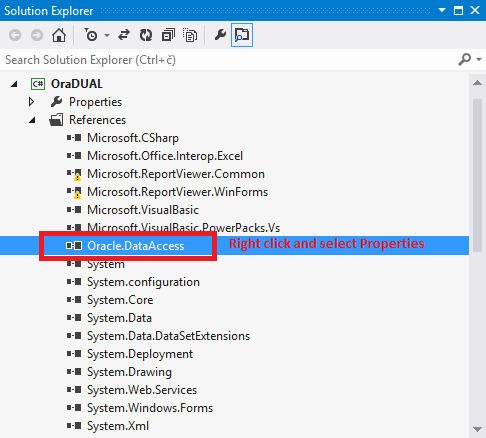
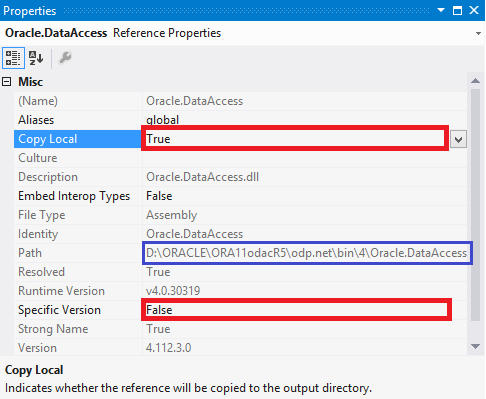
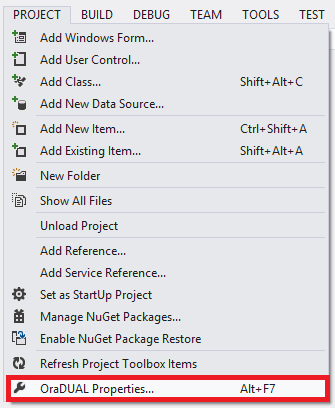
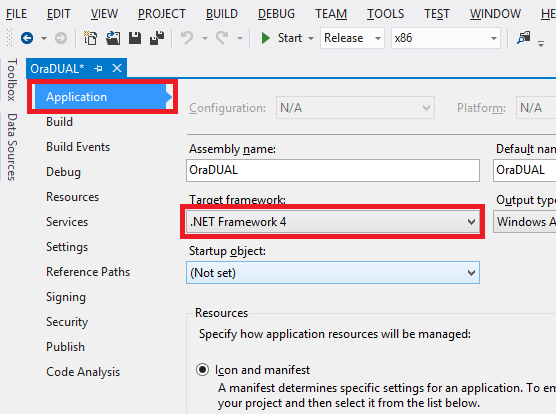
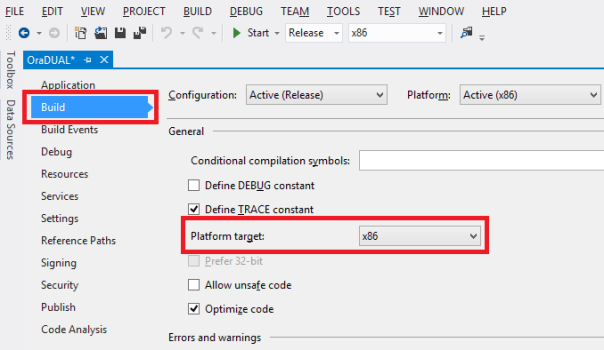
Note that on second picture application “build” is using locally installed Oracle.DataAccess.dll (framed in blue) and this is ok. Developers can use whatever Oracle.DataAccess.dll they want, even an older one (one of our application was developed with 10g Oracle.DataAccess.dll, but deployed to runtime env. with ODAC11g R5), because in the next step we’ll override developer “choice” with our network based (latest) ODAC 11g R5. And this can be done with app. config.
- Generate and then customize application config xml file (in our case OraDUAL.exe.config. And precisely here is where Oracle documentation is not clear and precise enough. How should application config look like that could be used on workstation without any Oracle client (more precisely on workstation where Oracle OUI or install.bat didn’t run, hence machine.config is untouched).
<?xml version="1.0" encoding="utf-8" ?>
<configuration>
   <!-- configSections was copied here from one of our developer's machine.config
        where ODAC11g R5 was installed with install.bat. Note that you can not
        blindly copy this section because different ODAC version may have
        different PublicKeyToken. Always check what Oracle sets up!
    -->
   <configSections>
    <section name="oracle.dataaccess.client" type="System.Data.Common.DbProviderConfigurationHandler, System.Data, Version=4.0.0.0, Culture=neutral, PublicKeyToken=b77a5c561934e089" />
    <section name="system.data.oracleclient" type="System.Data.Common.DbProviderConfigurationHandler, System.Data, Version=4.0.0.0, Culture=neutral, PublicKeyToken=b77a5c561934e089" />
   </configSections>

   <!-- This section needs either properly edited machine.config from Oracle OUI
        (or install.bat from instant client) or manually added configSections (see above).
        Note that DllPath needs to point to the Instant client directory,
        not to the Oracle.DataAccess.dll directory!
    -->
   <oracle.dataaccess.client>
    <settings>
      <add name="DllPath" value="N:\ORACLE\ORA11odacR5"/>
      <add name="FetchSize"             value="65536"/>
      <add name="PromotableTransaction" value="promotable"/>
      <add name="StatementCacheSize"    value="0"/>
      <add name="TraceFileName"         value="%TEMP%\odpnet.trc"/>
      <add name="TraceLevel"            value="0"/>
      <add name="TraceOption"           value="0"/>
    </settings>
  </oracle.dataaccess.client>

  <!-- Here we're telling .NET framework two things:
       - which version of Oracle.DataAccess.dll we want to be used
       - and from where exactly it should load the assembly.
       Any version of Oracle.DataAccess.dll between 0.0.0.0 and 4.112.3.0
       will be replaced by 4.112.3.0.
       Note that publicKeyToken is "hash" dedicated to Oracle Corp. but might
       change in the future. We checked the token against GAC.
  -->
  <runtime>
    <assemblyBinding xmlns="urn:schemas-microsoft-com:asm.v1">
      <dependentAssembly>
        <publisherPolicy apply="no" />
        <assemblyIdentity name="Oracle.DataAccess"
                          publicKeyToken="89B483F429C47342"
                          culture="neutral" />
        <bindingRedirect oldVersion="0.0.0.0-4.112.3.0"
                         newVersion="4.112.3.0"/>
        <codeBase
                version="4.112.3.0"
                href="file:///N:\ORACLE\ORA11odacR5\odp.net4\odp.net\bin\4\Oracle.DataAccess.dll"/>
      </dependentAssembly>
    </assemblyBinding>
  </runtime>
</configuration>
In case the application is build with additional libraries that internally depends on Oracle data provider (Oracle.DataAccess.dll) the same kind of config file needs to be prepared for each library (for example if OraDUAL.exe needs OraAcme.dll and OraAcme.dll is referencing Oracle.DataAccess.dll, then OraAcme.dll.config must be present with redirecting directives already shown in app.config).
- The final step is to prepare batch routine to launch our application from network drive.
:: RunOraDUAL.bat
:: Oracle11g [11.2.0.3] Instant Client with ODAC 11.2.0.3.20
::
:: Batch routine to launch OraDUAL.exe from newtork drive.
::
:: ---------------------------------------------------------

title Oracle11g Instant Client - ODAC 11.2.0.3.20
SET NLS_LANG=SLOVENIAN_SLOVENIA.EE8MSWIN1250
SET NLS_DATE_FORMAT=DD.MM.YYYY
SET ORACLE_HOME=N:\ORACLE\ORA11ODACR5
SET TNS_ADMIN=N:\ORACLE\ORA11ODACR5

SET PATH=%ORACLE_HOME%;%ORACLE_HOME%\ODP.NET4\BIN;%ORACLE_HOME%\odp.net4\odp.net\bin\4;%PATH%;

start OraDUAL.exe
:: End
Make sure that you include both \BIN directories that belongs to ODP.NET4 to the path!
In our case we put RunOraDUAL.bat in the same directory with OraDUAL.exe and OraDUAL.exe.config.
Note that you do NOT need to place Oracle.DataAccess.dll to application directory even though VisualStudio will copy
Oracle.DataAccess.dll in \BUILD directory because we instructed this with “Copy Local = True” (refer to screenshot #2)!
The only thing we copied to network share N:\APPS\OraDual is exe and config file.


SQL*Developer & fixing missing MSVCR100.DLL error
During SQL Developer 3.2 installation on Windows 7 x64 with Java JDK 7 update 7 I was greeted with the error about missing msvcr100.dll:

Copy msvcr100.dll file from JDK bin directory to SQL Developer directory:

ORA-00942 during upgrade from 10g to 11.2.0.3
While upgrading 10.2.0.5 database to 11.2.0.3 + Patch 8 on Windows 2008 R2 I got an error message
ORA-00942: table or view does not exist while DBUA was executing “Upgrading Oracle Server” step.
I ignored the error and proceed with an upgrade. A quick grep of the log revealed this:
[excerpt from ORACLE\cfgtoollogs\dbua\ACMEDB\upgrade1\Oracle_Server.log]
....
Rem
Rem Set capture file id equal to replay file id. This is the correct behavior
Rem for non-consolidated replays. Since this is an upgrade, this rule holds.
Rem
update sys.WRR$_REPLAY_DIVERGENCE set cap_file_id = file_id;
update sys.WRR$_REPLAY_DIVERGENCE set cap_file_id = file_id
*
ERROR at line 1:
ORA-00942: table or view does not exist
...
...
It’s a known bug according to MOS Note 1465852.1 “ORA-00942 reports during upgrade to 11.2.0.3 using manual or DBUA”. This bug affects only Oracle 11.2.0.3 for Windows and only if Patch bundle is installed before the upgrade. That was exactly my scenario, I installed 11.2.0.3 and then Patch 8.
According to MOS note we can ignore the error if remaining installation steps finish without errors and if components are valid afterwards:
select comp_name,status,version from dba_registry;
After upgrade we must run scripts that’ll rebuild DB Replay repository objects; just to be sure that we remove any depricated data from repository tables:
cmd>@%ORACLE_HOME%/rdbms/admin/catnowrr.sql
cmd>@%ORACLE_HOME%/rdbms/admin/catwrr.sql
OPATCH 11.2.0.3.0 LOCKS SRVM.JAR
A month ago I hit Bug 13902704 “SRVM.JAR IS LOCKED BY OPATCH 11.2.0.3.0” while trying to apply Patch 3 (Patch# 13570057) on top of 11.2.0.3 (Windows 7 x64 & 2008 R2). With Sysinternals Procmonitor (better than Process Explorer for tracing file usage) I soon found out that opatch 11.2.0.3 itself is locking out of the game install process.
Opatch greeted me with the error shown in the screenshot’s:


Ok, I said to myself, I’ll wait for Patch 4 (13783453), someone at Oracle will certainly notice such an apparent bug. It didn’t happen and I’m not surprised anymore. It’s not that nobody outside of the Oracle Corp. patches Oracle kernel, it’s more likely no one from Oracle Corp. is testing patch installation anymore. At least not in live.
Anyway, according to support note 1446273.1 the workaround for the bug is simple file rename before and after opatch apply:
cmd> move %ORACLE_HOME%\OPatch\jlib\oracle.opatch.classpath.jar %ORACLE_HOME%\OPatch\jlib\oracle.opatch.classpath1.jar
cmd> opatch apply
cmd> move %ORACLE_HOME%\OPatch\jlib\oracle.opatch.classpath1.jar %ORACLE_HOME%\OPatch\jlib\oracle.opatch.classpath.jar
Bug will be fixed in the next opatch release.
Tracing ORA-01031
Several months ago I got a brand new Lenovo Think Centre workstation at workplace with Windows 7 Enterprise Edition (x64). Of course, the first thing I always do is to install a bunch of Oracle software that serves as a playground. So, I installed 10gR2 and 11gR2 and created test databases for both versions. In addition to RDBMS I installed several other tools that I use more or less on a daily basis, or that I need while reproducing end user errors.
Everything worked as expected. At least at the beginning. After awhile, I noticed unsuspected error while connecting locally as sysdba on 11g instance.
I could successfully “connect / as sysdba” for two or three times in a row after fresh OS reboot, then when I tried to connect for third or forth time in a row as sysdba, I got ORA-01031 error out of the blue sky:

Being a member of ORA_DBA OS group, having SQLNET.AUTHENTICATION_SERVICES = (NTS) in SQLNET.ORA, not having any issues with 10g database, just with a 11g, having the same issue while being a standalone machine as well as being a domain member workstation…
I soon run out explanation other than: “…it must be something about BEQ protocol in 11g and/or some OS specific issue, I’ll troubleshoot later…”. Well, a lot later :-).
Today, I noticed Miladin Modrakovic recently wrote a blog post about errorstack tracing. Hmm…could this help me resolve my sporadic ORA-1031 errors while trying to connect locally as sysdba.
First, I issued:
SQL> alter system set events '1031 trace name errorstack level 3; name library_cache level 10';
and then I was trying to connect without a password:

Now, I should have a trace file generated for the ORA-01031 error, so I looked in alert.log for trace file:
...
Wed Nov 02 14:42:43 2011
Errors in file E:\ORACLE\diag\rdbms\test11\test11\trace\test11_ora_1936.trc:
ORA-01031: insufficient privileges
It took me some time glimpsing through file test11_ora_1936.trc as it was about 38MB in size.
When I saw tnsManager entry in error stack, I knew something weird is going on…

What the heck is tnsManager* doing in the trace file, if I’m not using this service at all in my 11g installment.
It turned out that I somehow forgot that I setup TNS_ADMIN variable system wide pointing to the tnsManager home directory. In that directory sqlnet.ora file was not setup properly (NTS was turned off), don’t have a clue why 10g worked despite that and why 11g worked sometimes. The bottom line is that thanks to error stack trace I was able to pinpoint the problem.
Finally, I disabled tracing with:
sql> alter system set events '1031 trace name errorstack off; name library_cache off';
As Miladin pointed out in his blog, errostack tracing is useful also for other common errors, such as ORA-00942, where Oracle reports error and then it’s up to you to pinpoint which permission is missing and this is more often than not a pain in the *ss.
Side note*: if you’re not familiar with tnsManager then you don’t know what you’re missing, it’s a great little gem….

 dbaportal.eu
You must be logged in to post a comment.