Author Archives: alesk
Replacement for choice.com on Windows 7 x64
I have a plenty of Windows interactive batch files that are using choice.com tool as a helper when I need some input from the user, for example:
:: ***********
:: * BEGIN   *
:: ***********
:begin
color 0e
cls
echo.
echo **********************************************
echo You started interactive batch script....
echo **********************************************
echo Select server:
echo (1) EUROPE
echo (2) ASIA
echo (3) US
echo (4) ALL THREE
echo (5) EXIT
echo.

..\util\choice /C:12345 Pick one

if errorlevel 5 goto end
if errorlevel 4 goto all
if errorlevel 3 goto US
if errorlevel 2 goto ASIA
if errorlevel 1 goto EUROPE

:EUROPE
... do some stuff ...
goto end

:ASIA
... do some stuff ...
goto end

:US
... do some stuff ...
goto end

:ALL
... do some stuff ...
goto end

:: END
:END
Choice.com is 16-bit application that can not run on Windows x64. The simplest workaround that I found is to use SET /P command. It’s a little bit of more code to write, but it’s quite trivial and does not hurt script readability. We can rewrite above script as:
:: ***********
:: * BEGIN   *
:: ***********
:begin
color 0e
cls
echo.
echo **********************************************
echo You started interactive batch script....
echo **********************************************
echo Select server:
echo (1) EUROPE
echo (2) ASIA
echo (3) US
echo (4) ALL THREE
echo (5) EXIT
echo.

set choice=
set /P choice="Select 1..5: "

::
:: I used ~0,1 to "substring" first character from the input
::
if not '%choice%'=='' set choice=%choice:~0,1%

if /I '%choice%'=='1' goto europe
if /I '%choice%'=='2' goto asia
if /I '%choice%'=='3' goto all
if /I '%choice%'=='5' goto end

::
:: if we came here then we know that user entered
::
echo "%choice%" is not a valid option
pause
echo.
goto begin


:EUROPE
... do some stuff ...
goto end

:ASIA
... do some stuff ...
goto end

:US
... do some stuff ...
goto end

:ALL
... do some stuff ...
goto end

:: END
:END
nssm replacement for srvany
For many years I run a particular python script as a service on my Windows XP machine. I used Microsoft Resource Kit tool srvany to “host” my script as as service. Recently, I replaced my XP machine at workplace with new one, running Windows 7 x64. Unfortunately, Microsoft stopped developing this tool, I heard that it still works, even on Windows 7 x64, but nevertheless I consider srvany as being dead.
Fortunately, there is good alternative, NSSM – Non Sucking Service Manager, free replacement for srvany with a bonus – it’s build for both, 32-bit and 64-bit OS.
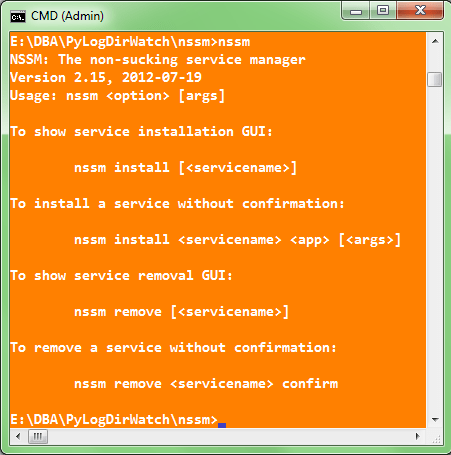
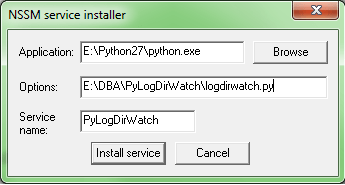
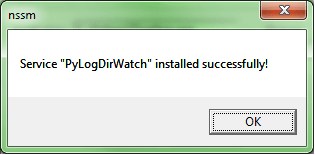
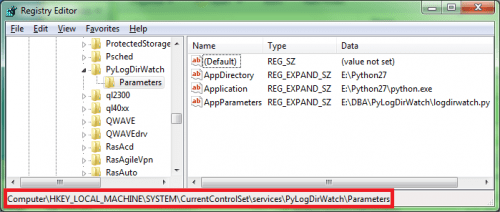
Download and simply unzip nssm archive, then open elevated command prompt and install the service with the command nssm install [], in my case:
cmd> nssm install PyLogDirWatch
ICONV for Windows
This is a short memo about installing iconv on Windows host (specifically: Windows 7 SP1 x64). Iconv is a handy Unix/Linux tool that is used for conversion between different character encodings.
Unfortunately, I’m not always in a position to use my favorite Linux distro at job, so here is a short recipe on how to setup iconv port for Win32.
- Download libiconv-1.9.1.bin.woe32.zip from Sourgeforge.net
- Download support library gettext-runtime-0.13.1.bin.woe32.zip from here. Make sure that you download exactly the version 0.13.1 and NOT newer, due to some compatibility issues!
- Create some directory, such as C:\UNIXUTIL\iconv
- Unzip the content of \bin from both zip files and save the content together in above directory.
The final content of iconv directory should look like this:
C:\UNIXUTIL\iconv>dir
 Volume in drive C has no label.
 Volume Serial Number is A88E-6A42

 Directory of C:\UNIXUTIL\iconv

11.10.2012  13:33    <DIR>          .
11.10.2012  13:33    <DIR>          ..
14.01.2004  21:59            28.672 asprintf.dll
14.01.2004  01:56            24.576 charset.dll
14.01.2004  21:59            20.480 envsubst.exe
14.01.2004  21:59            20.480 gettext.exe
07.10.2003  21:17             2.715 gettext.sh
14.01.2004  01:56           892.928 iconv.dll
14.01.2004  01:56            16.384 iconv.exe
14.01.2004  21:59            45.056 intl.dll
14.01.2004  21:59            20.480 ngettext.exe
              11 File(s)      1.071.780 bytes
               2 Dir(s)  57.396.654.080 bytes free

C:\UNIXUTIL\iconv>
Usage:
C:\UNIXUTIL\iconv>iconv --help
Usage: iconv [--binary] [-c] [-s] [-f fromcode] [-t tocode] [file ...]
or:    iconv -l
List of supported code pages:
C:\UNIXUTIL\iconv>iconv -l
Example of converting file from utf-8 to cp1250 encoding:
C:\UNIXUTIL\iconv>iconv -f utf-8 -t cp1250 utf-8.txt > cp1250.txt
SQL*Developer & fixing missing MSVCR100.DLL error
During SQL Developer 3.2 installation on Windows 7 x64 with Java JDK 7 update 7 I was greeted with the error about missing msvcr100.dll:

Copy msvcr100.dll file from JDK bin directory to SQL Developer directory:

ORA-00942 during upgrade from 10g to 11.2.0.3
While upgrading 10.2.0.5 database to 11.2.0.3 + Patch 8 on Windows 2008 R2 I got an error message
ORA-00942: table or view does not exist while DBUA was executing “Upgrading Oracle Server” step.
I ignored the error and proceed with an upgrade. A quick grep of the log revealed this:
[excerpt from ORACLE\cfgtoollogs\dbua\ACMEDB\upgrade1\Oracle_Server.log]
....
Rem
Rem Set capture file id equal to replay file id. This is the correct behavior
Rem for non-consolidated replays. Since this is an upgrade, this rule holds.
Rem
update sys.WRR$_REPLAY_DIVERGENCE set cap_file_id = file_id;
update sys.WRR$_REPLAY_DIVERGENCE set cap_file_id = file_id
*
ERROR at line 1:
ORA-00942: table or view does not exist
...
...
It’s a known bug according to MOS Note 1465852.1 “ORA-00942 reports during upgrade to 11.2.0.3 using manual or DBUA”. This bug affects only Oracle 11.2.0.3 for Windows and only if Patch bundle is installed before the upgrade. That was exactly my scenario, I installed 11.2.0.3 and then Patch 8.
According to MOS note we can ignore the error if remaining installation steps finish without errors and if components are valid afterwards:
select comp_name,status,version from dba_registry;
After upgrade we must run scripts that’ll rebuild DB Replay repository objects; just to be sure that we remove any depricated data from repository tables:
cmd>@%ORACLE_HOME%/rdbms/admin/catnowrr.sql
cmd>@%ORACLE_HOME%/rdbms/admin/catwrr.sql

 dbaportal.eu
You must be logged in to post a comment.