Author Archives: alesk
Preparing for winter
Two days ago I was attending annual, one day conference, dedicated to virtualization with VMWare products.
More or less all presenters were using vendor provided slides, often the same or very similar (boring). Only a handful prepared their own presentation. In my opinion the highlight of the day was gentlemen from SRC d.o.o, who illustrated very well the paradox of various (failed) predictions from Gartner, Forrester Research and similar bunch of companies who’re “predicting” the future with “statistical observations”, with a joke about predicting the winter.
Here is my translation of the joke from Slovenian to English (with my interpretation):
It’s autumn and time to prepare for the winter in a small North American Indian village.
Local Indians are visiting their shaman to get some advice about the coming winter.
Indians: “Hau shaman, can you tell us how chilly this winter will be?”
Shaman: “Hau my people! Better prepare the firewood for the winter, because long and chilly winter is ahead of us.”
Indians: “Are you sure about that?”
Shaman: “Of course I’m sure, I’m not your shaman for nothing!?#%?… But, I’m willing to seek further confirmation with our Manitou. Please come back in a week or two.”
Indians: “Ok, chief, we’ll start to prepare the firewood immediately, see you next week.”
As soon as Indians left the shaman tent, he called his white man friend, meteorologist in the nearby city.
Shaman: “Hi Bill, long time no see, we shall meet and smoke a pipe or two. By the way, can you help me with the weather forecast for this winter?”
Bill: “Sure chief, what do you want to know?”
Shaman: “What’ll winter be this year?”
Bill: “Ughh.hmm…I think it’ll be long and chilly winter.”
Shaman: “You think or do you know?”
Bill: “Well, I don’t have all data at hand, but I can do some additional research, just for you, my friend. Please call me in a week or two.”
Shaman: “Thanks Bill!”
Weeks goes by, Indians preparing the firewood started complaining; hard work in the wood hurt their backs, they started to wonder if the winter will really be as cold as shaman predicted.
Shaman sensed the tension in the village, furiously picked his iPhone and quickly dialed meteorologist.
Shaman: “Hau Bill, what’s up? Did you get your forecast data for this winter?”
Bill: “Good news chief, I can firmly confirm that the winter will indeed be long and harsh. For several weeks we observed how Indians are madly chopping down the trees, they must be preparing for harsh winter…”
Shaman: “What the @$%&#$%”
Disclaimer: any resemblance to real life reports from various IT researchers is a pure coincidence.
ROM upgrade on HTC Hero
I tried for several days to somehow make HTC Sync (the latest and greatest Version: 2.0.18, that should work with Windows 7, but does not) connect to my HTC Hero. Finally, I gave up and decided to use Windows XP workstation for ROM upgrade. The reason I decided to upgrade from ROM 1.76.405.6 to 2.73.405.5 was sluggish screen navigation. Barely noticeable but annoying, nevertheless.
Here it is what I did to upgrade ROM on HTC Hero:
- made a backup of my files on SD card
- downloaded and installed the latest HTC Sync Version 2.0.18 on my Windows XP SP3 Workstation [protected with UPS, of course]
- connectec HTC Hero to Windows XP workstation with HTC Sync
- downloaded and installed ROM Upgrade for HTC Hero, Version 2.73.405.5, after I read accompanying readme. Update was done in approximately 4 minutes.
- new ROM means that you’ll need to repeat registration process (make sure you note down APN data of your mobile provider, otherwise you’ll not have data access to Google!) and make some minor tweaks, such as pick your default ring tone, setup wallpaper, re-create bookmarks, thumb pictures of your favorite people, enter your stocks in Yahoo Finance! etc. I hope some day HTC will provide a better backup method than limited HTC Sync with calendar and contacts backup. And that is not all, you’ll also need a fresh installation of all the applications that you installed from Android Market.
[Unfortunately, I found out about Android excellent Astro File Manager application too late to use it to backup my old applications. Sic.]
Installation of applications can be time consuming and error prone process. For example my attempt to install my “old” applications failed miserably – hanging with “Starting download…” messages. I found on the net several hints about rectifying stuck download, what worked in my case was to clear the cache:Menu->Settings->Applications->Manage Applications->then scroll down and select the Market and "Clear cache".
Since my hands were already dirty, I decided to setup Dalvik Debug Monitor, primarily for taking some screen shots of my phone. Here it is:
- downloaded Android SDK, at the time of writing this blog it was android-sdk_r05-windows.zip
- I unzipped file in some temporary directory
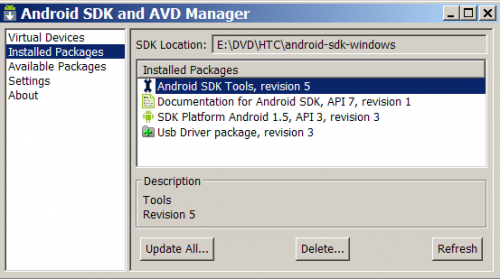
- then I run “SDK setup.exe” from directory where I unzipped SDK (E:\DVD\HTC\android-sdk-windows)
- I checked for installation only packages that are needed for Android 1.5 platform (see below picture)
- connect your HTC Hero to USB port on your computer and check that USB debugging is turned on (Menu->Settings->Applications->Development->check USB debugging)
- run Dalvik Debug Monitor by executing ddms.bat from \android-skd-windows\tools directory. When GUI starts, select yout HTC from left upper pane, then open Device menu and select Screen capture. That’s it. Here are some screen shot examples from my HTC:
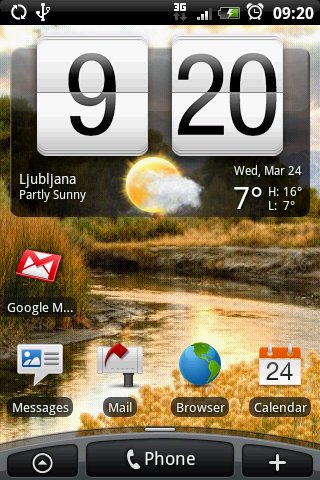
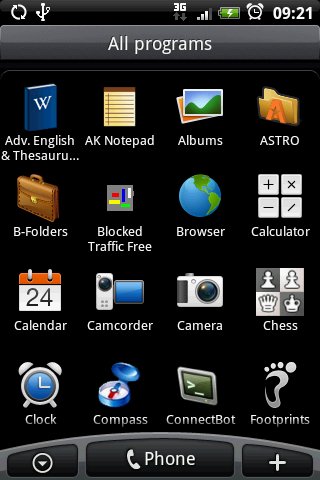

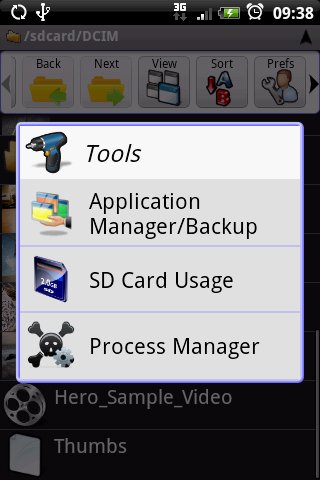
The last picture is from Astro File Manager, imho a must have application for every android based phone owner!
After a day of using HTC Hero with upgraded ROM, all I can say is that screen navigation is now smooth. Certainly an upgrade effort worth of my time.
Pseudo tape backup with RMAN
Today I was looking for a way to test RMAN tape backup on a machine without a tape device. I barely remembered that I somewhere read that RMAN supports that. With some cross search on different keywords I finally found Metalink support note 312737.1 “RMAN and Specific Media Managers Environment Variables.” .
Here is the output from my backup test on Windows 2003 (x86) with Oracle 10.2.0.2:
RMAN> run {
2>  allocate channel c1 device type 'SBT_TAPE'
3>   parms="SBT_LIBRARY=oracle.disksbt,ENV=(BACKUP_DIR=D:\BACKUP)";
4>  backup database;
5> }

allocated channel: c1
channel c1: sid=27 devtype=SBT_TAPE
channel c1: WARNING: Oracle Test Disk API

Starting backup at 23.03.10
channel c1: starting full datafile backupset
channel c1: specifying datafile(s) in backupset
input datafile fno=00001 name=E:\ORADATA\ORA5\DATA\DATA01\SYSTEM01.DBF
input datafile fno=00004 name=E:\ORADATA\ORA5\DATA\DATA01\USERS01.DBF
input datafile fno=00002 name=E:\ORADATA\ORA5\DATA\DATA01\UNDOTBS01.DBF
input datafile fno=00003 name=E:\ORADATA\ORA5\DATA\DATA01\SYSAUX01.DBF
channel c1: starting piece 1 at 23.03.10
channel c1: finished piece 1 at 23.03.10
piece handle=01l99etn_1_1 tag=TAG20100323T094735 comment=API Version 2.0,MMS Version 8.1.3.0
channel c1: backup set complete, elapsed time: 00:05:15
channel c1: starting full datafile backupset
channel c1: specifying datafile(s) in backupset
including current control file in backupset
including current SPFILE in backupset
channel c1: starting piece 1 at 23.03.10
channel c1: finished piece 1 at 23.03.10
piece handle=02l99f7i_1_1 tag=TAG20100323T094735 comment=API Version 2.0,MMS Version 8.1.3.0
channel c1: backup set complete, elapsed time: 00:00:05
Finished backup at 23.03.10
released channel: c1

RMAN> list backup;


List of Backup Sets
===================

BS Key  Type LV Size       Device Type Elapsed Time Completion Time
------- ---- -- ---------- ----------- ------------ ---------------
1       Full    1.26G      SBT_TAPE    00:05:13     23.03.10
        BP Key: 1   Status: AVAILABLE  Compressed: NO  Tag: TAG20100323T094735
        Handle: 01l99etn_1_1   Media:
  List of Datafiles in backup set 1
  File LV Type Ckp SCN    Ckp Time Name
  ---- -- ---- ---------- -------- ----
  1       Full 26436829   23.03.10 E:\ORADATA\ORA5\DATA\DATA01\SYSTEM01.DBF
  2       Full 26436829   23.03.10 E:\ORADATA\ORA5\DATA\DATA01\UNDOTBS01.DBF
  3       Full 26436829   23.03.10 E:\ORADATA\ORA5\DATA\DATA01\SYSAUX01.DBF
  4       Full 26436829   23.03.10 E:\ORADATA\ORA5\DATA\DATA01\USERS01.DBF

BS Key  Type LV Size       Device Type Elapsed Time Completion Time
------- ---- -- ---------- ----------- ------------ ---------------
2       Full    7.00M      SBT_TAPE    00:00:04     23.03.10
        BP Key: 2   Status: AVAILABLE  Compressed: NO  Tag: TAG20100323T094735
        Handle: 02l99f7i_1_1   Media:
  Control File Included: Ckp SCN: 26436829     Ckp time: 23.03.10
  SPFILE Included: Modification time: 22.03.10

RMAN>
Needless to say that Oracle Test Disk API is not meant to be used in production, thought I found some posts on the net in which some folks are using oracle.disksbt API as a workaround for backup of recovery area to disk; thus avoiding the limitation of mandatory usage of SBT channel for backup of recovery area. I certainly don’t recommend abusing this test API for such workaround.
RSA Tools For Windows 7
Thanks to TechRepublic newsletter I learned today that Microsoft released Remote Server Administration Tools for Windows 7 that can be downloaded from Microsoft Download center. At the time when Vista was released, Microsoft announced that they’ll not port Remote admin tools to this OS, instead they suggested really stupid workaround, Remote Desktop. Hello?? Back then I thought, what a bummer for Microsoft, now Vista is definitely not something I would care to even test at my workplace nor recommend to anyone. Fortunately, someone at Microsoft realized the mistake.
Anyway, you can install RSA Tools on Windows 7 Enterprise, Ultimate and Professional and you can manage Serve 2003/R2, Server 2008/R2. List of remote features that can be managed can be found in KB article 958830.
Windows 7 guest on VMWare Server 2.0
Today I spent considerable amount of time troubleshooting mysterious freezing of Windows 7 workstation that runs on VMWare Server 2.0.0 (Build 122589) as as guest. (I’m well aware that newer release of VMWare Server 2 is available and I would not hesitate installing it if I could only skip the required reboot of the host.)
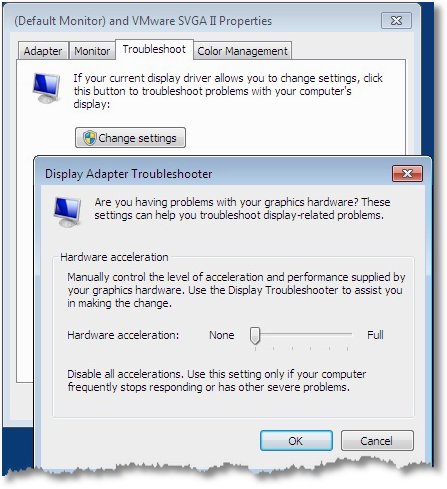
Making long story short I finally found some indications on the net that video hardware acceleration might be the culprit for the problem. So, I turned Hardware acceleration completely off and problem was solved.

 dbaportal.eu
You must be logged in to post a comment.